Attribute 'monitoring_display'
 | Available from TwinCAT 3.1 Build 4026 |
This pragma in the declaration of a function block or structure causes the current value of the specified component (property or variable) to be displayed in the monitoring.
The value of the function block or structure component is then displayed in the top line of the monitoring for variables of the function block or structure type.
If you choose a property as the component to be displayed, the property must be declared with the attribute {attribute 'monitoring' := 'call'} (see also: Attribute 'monitoring').
Syntax: {attribute 'monitoring_display' := '<component name>'}
Insertion location: Above the first line of the declaration
Example
Structure ST_Sample:
{attribute 'monitoring_display' := 'sValue'}
TYPE ST_Sample:
STRUCT
    nVar1  : INT := 1;
    nVar2  : INT := 2;
    sValue : STRING := 'Value to be monitored';
END_STRUCT
END_TYPE
Function block FB_Sample_Var:
{attribute 'monitoring_display' := 'nB'}
FUNCTION_BLOCK FB_Sample_Var
VAR
    nA    : INT;
    nB    : INT := 10;
END_VAR
Function block FB_Sample_Prop:
{attribute 'monitoring_display' := 'P_B'}
FUNCTION_BLOCK FB_Sample_Prop
VAR
    nA    : INT;
    nB    : INT := 10;
END_VAR
Property FB_Sample_Prop.P_A:
PROPERTY P_A : INTP_A := 2*nA;Property FB_Sample_Prop.P_B:
{attribute 'monitoring':='call'}
PROPERTY P_B : INT
P_B := 2*nB;Program MAIN:
PROGRAM MAIN
VAR
    stSample      : ST_Sample;
    fbSampleVar   : FB_Sample_Var;
    fbSampleProp  : FB_Sample_Prop;
END_VAR
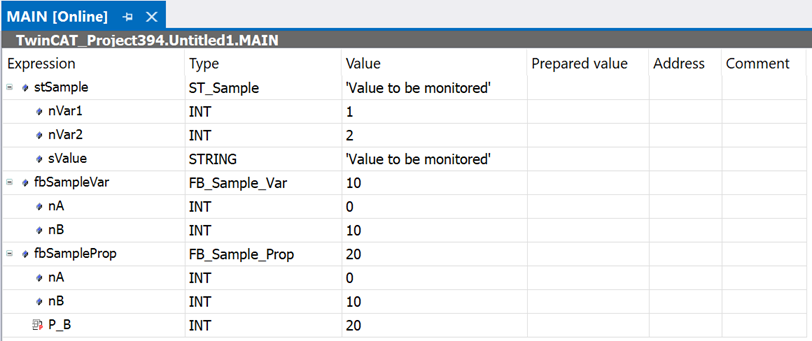
The respective selected component is displayed online in the instance line for the structure instance and for the two FB instances.