Advanced settings for specific applications
For CAN FD, there are advanced settings for specific applications.
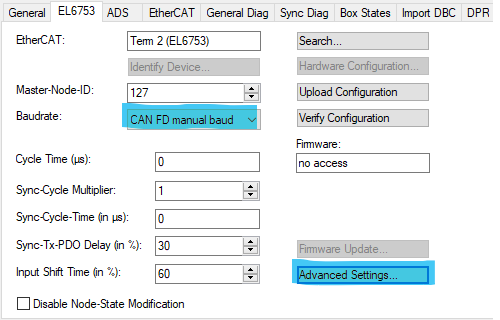
To do this, click on Advanced Settings. If you have also selected a manual baud rate for CAN FD, you can adjust the bit timing and customize it to suit your needs.
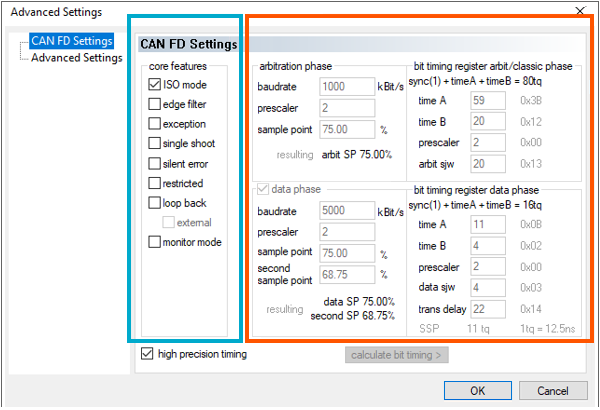
ISO Mode
When Bosch introduced the first specification for CAN FD in 2012, it was immediately implemented by various semiconductor manufacturers in early microcontrollers and test tools. However, during the subsequent incorporation into the official ISO standard (2015), a mathematical vulnerability was discovered in the detection of certain bit flips. ISO subsequently adjusted the frame format, resulting in the creation of ISO mode.
ISO mode introduces additional security features in the data frame to ensure comprehensive error detection:
- Stuff-bit counter (stuff count):
In ISO mode, a 3-bit counter plus a parity bit is inserted before the CRC field. This counts the number of dynamic stuff bits in the frame. This counter is not available in non-ISO mode. - Fixed stuff bits:
In the CRC field of both modes, stuff bits with inverted levels are inserted at fixed positions, which improves synchronization. - Modified CRC calculation:
The mathematical calculation of the checksum (CRC) differs between the two modes. The polynomials are indeed the same. In ISO mode, however, the starting value is different, and the stuff bits are included in the calculation.
If you establish a connection between a controller in ISO mode and a controller in non-ISO mode, the controllers will not recognize each other’s CRC checksums. This inevitably leads to error frames, and communication is interrupted.
- Current standard:
Almost all modern production vehicles and CAN FD controllers (e.g., newer MCAN revisions or STMicroelectronics FDCAN) use ISO mode by default. - Non-ISO mode:
Non-ISO mode generally exists only as a backward compatibility option in development tools (e.g., Vector interfaces or PEAK system adapters) to communicate with very old ECU prototypes from 2012 through 2015.
Edge filter
The edge filter in CAN FD controllers is a hardware function designed to suppress short interference pulses during the bus integration phase.
Operating principle and purpose
- Two dominant bits:
When enabled, the hardware requires at least two consecutive dominant time quanta (tq) to detect a hard synchronization or an edge. - Against spikes:
It filters out short, dominant spikes that are only 1 (tq) long, which would otherwise reset the counter used to detect bus idle (11 recessive bits) and delay bus integration. - Only when integrated:
This function is active only during the integration phase (after startup or protocol exceptions) and does not take effect during normal communication operations.
Effect: During accurate synchronization with the bus (after startup or after a bus-off), very short glitches are ignored.
Application: Cables with interference or reflections.
Exception
Protocol exception for a defined procedure when a control device receives a message that uses a newer format with which it is not yet familiar.
Effect: Frames from a newer protocol (e.g., CAN XL) are ignored instead of being answered with an error frame.
Application: Networks with CAN-XL participants.
Single Shot
The controller makes exactly one attempt to send a message. If this fails (loss of arbitration or error frame), the controller terminates. The message is discarded or remains in the buffer as “failed”, and a corresponding error is set.
Application: Timer-controlled communication and testing. Not suitable for CANopen, as telegrams may be lost.
Silent error
In CAN, a silent error means that the problem is logged internally (the software can read it), but the hardware deliberately refrains from burdening the bus with error signals or retransmissions.
Effect: Detected errors are not reported via an active error frame on the bus.
Restricted
In this mode, the controller is allowed to participate in bus traffic, but its ability to actively respond to errors is severely limited:
- Normal reception and ACK:
The controller receives data frames and remote frames as usual. When it receives a telegram without errors, it also sends the acknowledgment (ACK bit) to the bus. - Transmission of the controller’s own data prohibited:
It must not actively send its own data frames or remote frames. - Silent on errors (no active error frames):
This is the most important difference from normal operation: if the controller detects an error on the bus, it must not send a dominant active error flag. It behaves passively, does not increment its error counters, and simply waits silently until the bus returns to the idle state so it can resynchronize.
Function: The CAN participant receives and acknowledges telegrams (ACK), but does not send any telegrams or error frames itself.
Use: Monitoring the bus without affecting communication (though telegrams are acknowledged).
Loopback
Behavior: The connection to the physical CAN bus is completely disconnected. The transmit line (Tx) is blocked at the output of the CAN module, so that no signal can pass through to the transceiver. The CAN bus is completely unaware of this test. The receive line (Rx) is ignored by the real bus.
Use: Perfect for self-tests at system startup. The software can verify whether the terminal’s CAN module is functioning properly, whether registers are being written correctly, and whether the internal baud rate generation is working, without interfering with actual network traffic.
External Loopback Mode
Behavior: Can only be selected in conjunction with Loopback. The signal is sent to the physical bus anyway (Tx remains active). At the same time, however, the controller ignores the bus’s actual Rx line and instead monitors its own Tx line internally.
Operation: This mode is used to test the entire hardware chain, including the transceiver and bus cabling. This allows the control device to verify whether its signals are physically being transmitted correctly to the bus and reflected there.
Monitor Mode
Effect: Passive monitoring only. The terminal does not transmit, does not acknowledge (no ACK), and does not send error frames.
Application: Bus analysis. There must be at least two other active participants on the bus.
Auto Ack (in preparation)
Effect: The terminal acknowledges its own telegrams.
Application: Tests in which the terminal is connected only to the bus.