Runtime configuration
As of version 4026.21, TwinCAT 3.1 provides the user mode Runtime as a replacement for the real-time Runtime, because more and more XAE installations on Windows do not meet the Hyper-V requirements (see system requirements) due to IT security requirements. On these systems, it is not possible to execute the control applications using the real-time runtime, only pure engineering (coding, compiling, etc.).
Since build 4026.21, the installation therefore offers the possibility to choose a runtime from several options. On the command line, this is referred to as XarMode.
- Real-time runtime (XarMode: KM): For the classic, well-known real-time runtime in kernel mode
- User mode runtime (XarMode: UM): For the new user mode runtime (without real-time) for engineering and debugging code
- Real-time and user mode (XarMode: KMWithUM): To install the real time runtime as before, but also use the user mode runtime.
Preselection of the runtime by the TwinCAT Package Manager
Before the first installation, the TwinCAT Package Manager selects a default setting as to which runtime (XarMode) should be used. This choice can be changed in the user interface or via the command line.
The following table shows the selection options:
Installation system | Description | Real-time runtime (XarMode: KM) | Realtime runtime and user mode Runtime (XarMode: KMWithUM) | User mode runtime (XarMode: UM) |
|---|---|---|---|---|
Full access | PCs without Hyper-V restrictions, such as Beckhoff IPCs | Default | Permitted | Permitted |
Windows 10 64-bit from version 20H2 or Windows 11 with Hyper-V enabled (e.g. VBS) | PCs with Hyper-V restrictions (typically engineering systems) | Permitted (no Run Mode possible) | Permitted (no real-time Run Mode possible) | Default |
Windows on Arm® | Windows on Arm® systems (typically engineering systems) | Not possible | Not possible | Default |
32-bit or Windows 10 prior to 20H2 | Older Windows systems (typically without restrictions) | Default | Not possible | Not possible |
Restrictions
- The user mode runtime provides an execution environment without real-time behavior. The execution of multiple cycles may differ from real-time execution on real control systems.
- As the user mode runtime can execute a minimum cycle time of 1 ms, there will be differences, especially in configurations with faster clocks.
For a more detailed description of the timing behavior, see the documentation for the user mode Runtime. - Remote Manager versions can only be used to a limited extent:
- RM 4026.0 to 4026.13: Not available with the user mode runtime
- RM 4024 (all) can communicate with remote systems via the user mode runtime.
Local executions on the user mode runtime are not possible.
Changing the runtime configuration
- 1. Click on the Settings button.
- 2. Switch to the Runtime tab.
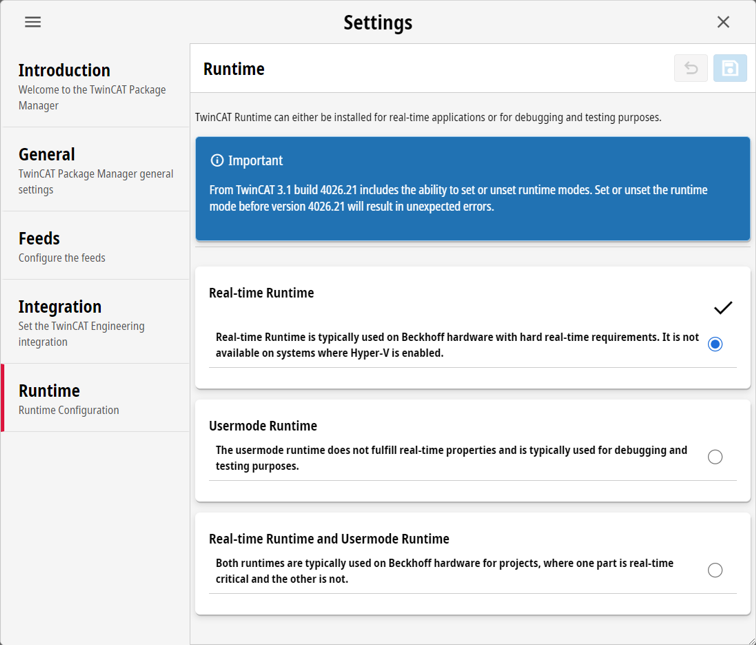
- 3. Select a runtime configuration.
- 4. Save the choice.
- Packages are uninstalled and installed according to your configuration.