Migrate existing TwinCAT software
If you want to upgrade an existing TwinCAT 3 system to TwinCAT 3.1 Build 4026, all installed functions must be migrated to the corresponding workloads from the TwinCAT Package Manager. The TwinCAT Package Manager assists you with this. To perform the migration, you need access to the Beckhoff Stable or Testing Feed.
If you are using an offline system, you must first download the TwinCAT.XAE.MigrateCli package on a system with online access. You then transfer this to the offline system and set up the path to the file as a local feed.
- 1. Download the TwinCAT Package Manager for the migration.
- 2. Install it according to the chapter Downloading and installing TwinCAT Package Manager.
- When you open the program for the first time, the wizard will appear to guide you through the initial configuration. The TwinCAT Package Manager automatically recognizes that you have an existing TwinCAT installation and offers you the Migration function in the wizard after the initial settings.
- 3. Follow the steps of the wizard and add a feed according to the chapter Accessing TwinCAT software.
- A feed must be available for migration.
- 4. Select the Migration tab.
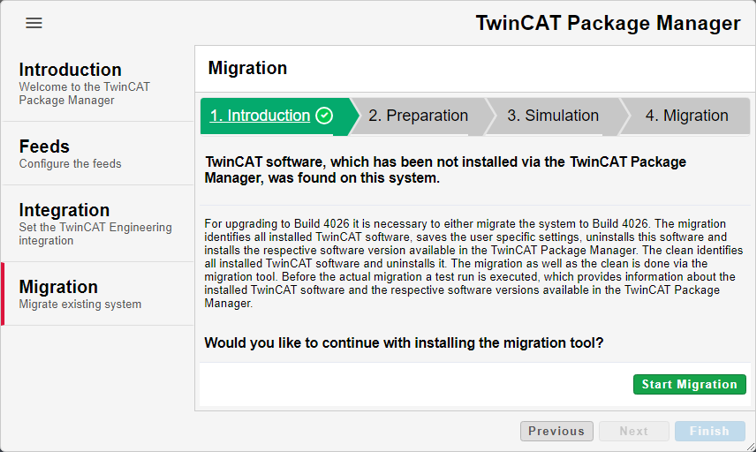
- 5. Click on Start Migration to begin the migration.
- 6. Carry out the configuration steps by clicking on Next.
- The first step is to download the migration tool from the feeds. This then carries out a simulation in the next step. This checks which TwinCAT functions are installed on your system and the corresponding workloads with associated packages are searched for and listed in the TwinCAT Package Manager.
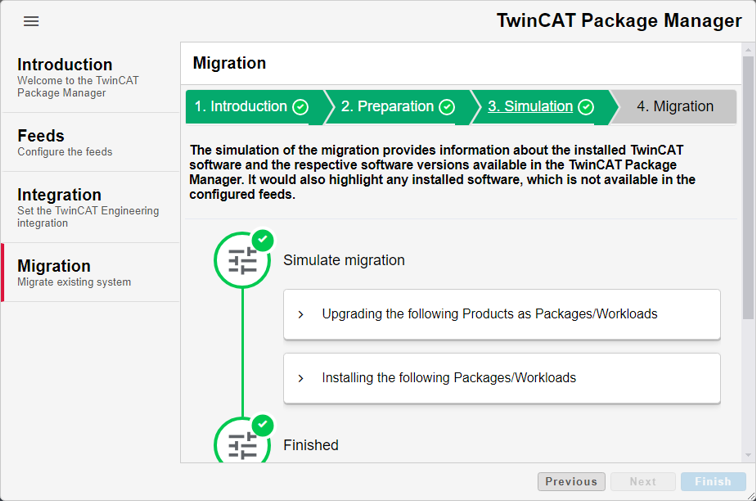
- 7. Confirm the simulation with Next so that the old setups are uninstalled and the new workloads are installed instead.
- Finally, your system is ready to use TwinCAT 3.1 Build 4026.