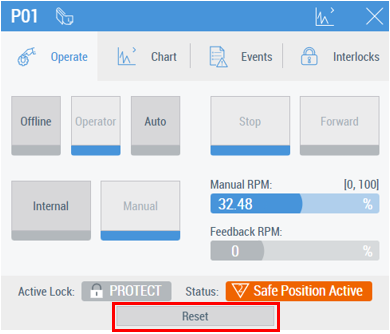
Footer
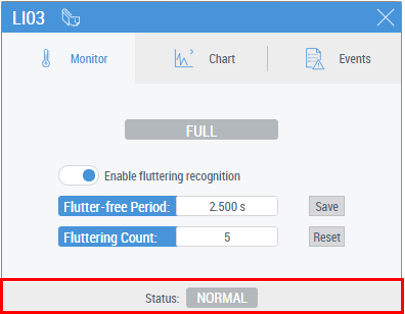
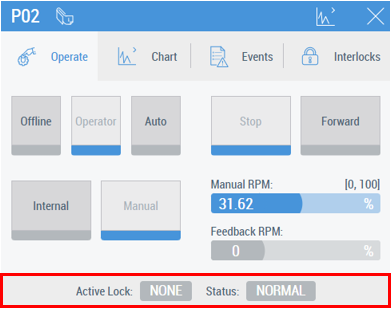
Some of the predefined faceplates have a footer to show current locks, statuses, warnings and alarms for their P&ID element. A set of the footer elements depends on the type of DataAssembly which MTP PLC Library FB presents.
This is an example of a faceplate with the footer containing only the Status element (in “NORMAL” state):
This is an example of a faceplate with the footer containing the Active Lock element (in state “NONE”) and the Status element (in “NORMAL” state):
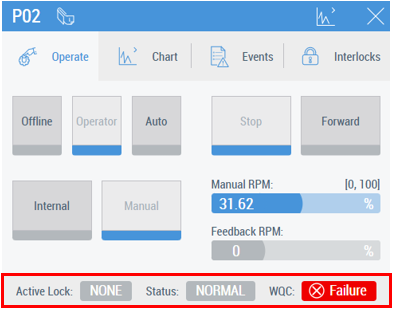
For faceplates which have the footer, the WQC message element also appears in addition to other messages if the WQC status has an active value (see table). An example of an active WQC message element:
The following table shows the Status element states and gives a list of MTP types which may have the specific state on their predefined faceplates:
# | Status element state | Description | MTP types |
|---|---|---|---|
1 |
| Normal state | AnaMon DIntMon AnaDrv MonAnaDrv AnaVlv MonAnaVlv BinMon BinDrv MonBinDrv BinVlv MonBinVlv TriPosVlv MonTriPosVlv |
2 |
| Alarm High Active | AnaMon DIntMon |
3 |
| Alarm Low Active | AnaMon DIntMon |
4 |
| Warning High Active | AnaMon DIntMon |
5 |
| Warning Low Active | AnaMon DIntMon |
6 |
| Tolerance High Active | AnaMon DIntMon |
7 |
| Tolerance Low Active | AnaMon DIntMon |
8 |
| Safe Position is activated (safe operation) | AnaDrv MonAnaDrv AnaVlv MonAnaVlv BinDrv MonBinDrv BinVlv MonBinVlv TriPosVlv MonTriPosVlv |
9 |
| Drive Protection triggered: there is a problem with the drive | AnaDrv MonAnaDrv BinDrv MonBinDrv |
10 |
| RPM alarm high is active | MonAnaDrv |
11 |
| RPM alarm low is active | MonAnaDrv |
12 |
| Hold state is active after monitoring error triggered | MonAnaDrv MonAnaVlv MonBinDrv MonBinVlv MonTriPosVlv |
13 |
| Safe position is active after monitoring error triggered | MonAnaDrv MonAnaVlv MonBinDrv MonBinVlv MonTriPosVlv |
14 |
| Fluttering signal recognized | BinMon |
15 |
| Fallback message if alarm is active |
|
16 |
| Fallback message if warning is active |
|
17 |
| Fallback message if tolerance is active |
|

















The following table describes the Active Lock element states and gives a list of MTP types which can have the specific state on their predefined faceplates:
# | Active Lock element state | Description | MTP types |
|---|---|---|---|
1 |
| No active locks | AnaDrv MonAnaDrv AnaVlv MonAnaVlv BinDrv MonBinDrv BinVlv MonBinVlv TriPosVlv MonTriPosVlv |
2 |
| Allows control | |
3 |
| Prevents from being activated and sets it to safe position | |
4 |
| Prevents from being activated and sets it to safe position, requires a reset command |


The following table describes the WQC element states and gives a list of MTP types which can have the specific state on their predefined faceplates:
# | WQC element state | Description | MTP types |
|---|---|---|---|
1 |
| Failure | AnaDIntMon DIntMon AnaDrv MonAnaDrv AnaVlv MonAnaVlv BinMon BinDrv MonBinDrv BinVlv MonBinVlv TriPosVlv MonTriPosVlv |
2 |
| Function Check | |
3 |
| Maintenance Request | |
4 |
| Out of Specification | |
5 |
| Out of Service |





When an emergency state of the control is active, the reset button appears: