Installation
Using the TwinCAT HMI Process Library requires installation of TwinCAT HMI components. See the corresponding instructions in the documentation for TE2000.
The steps for installing a package for the HMI Process Library are shown below.
- 1. TwinCAT Package Manager should be used for the installation of the HMI Process Library. It’s available as a separate package TwinCAT.HMI.PI.ProcessLibrary or within the TE8400 | TwinCAT 3 MTP Engineering workload.
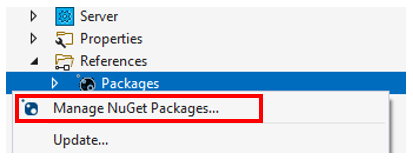
- 2. Select Manage NuGet Packages in the context menu of the Packages node:
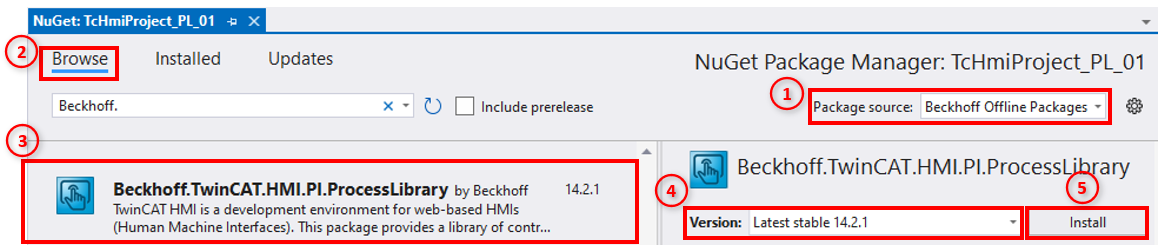
- 3. Then choose Package source: Beckhoff Offline Packages → Browse tab → Beckhoff.TwinCAT.HMI.PI.ProcessLibrary → Choose Version → Install button:
- When the HMI Process Library package is installed, other packages that it depends on are also installed.
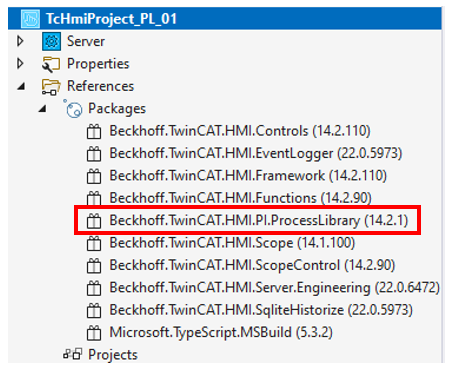
- The package should appear after the installation: