Creating a New C++ Module
Within a C++ project, individual TwinCAT modules are created as separate classes. Each module implements a specific TwinCAT module interface, which defines how the module is integrated into the runtime system. Typical variants include cyclically clocked I/O modules, ADS communication nodes, and simple base modules without any specific system connection. When a module is created, the module type is passed as the vInfo parameter in CreateChild() and serves as the wizard name, determining which code wizard generates the class stubs. The parent object of the call is the project node of the C++ project, not the higher-level TIXC node.
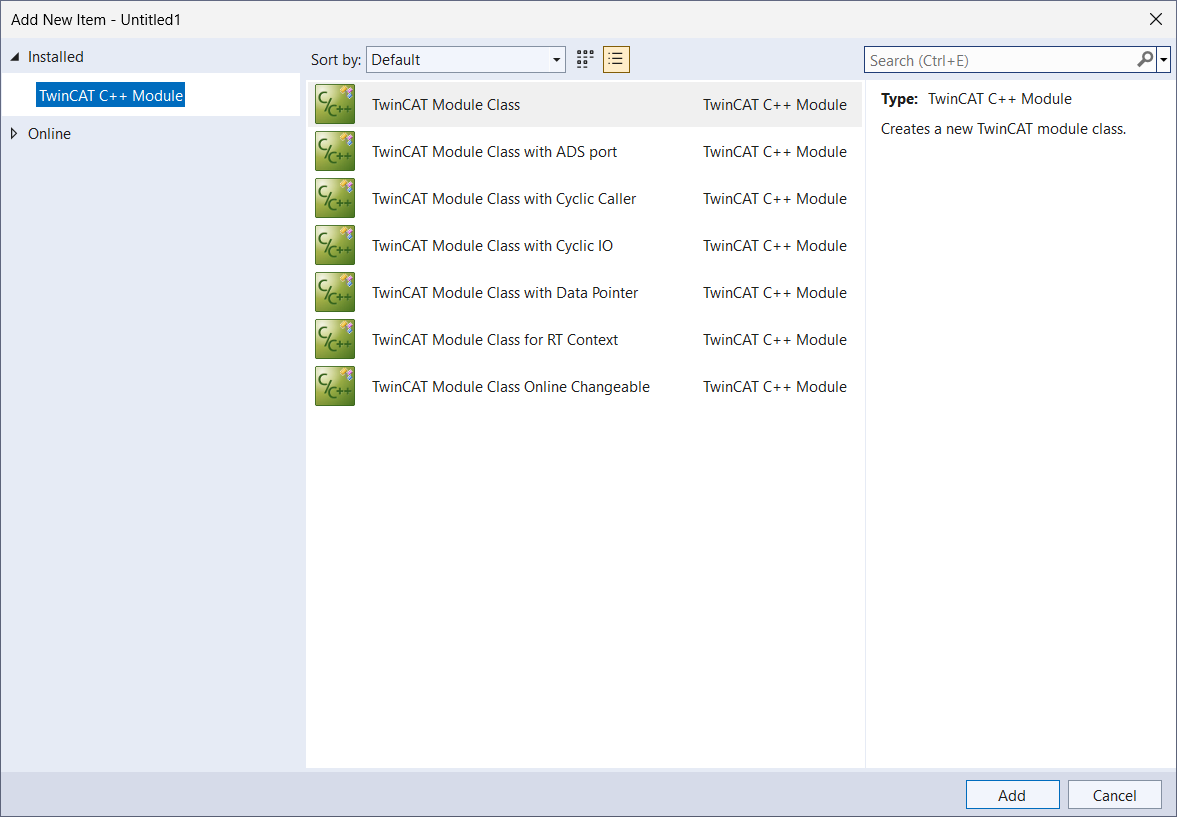
Sample
The following sample shows how to create an empty module using TcModuleEmptyWizard. For other module types, you must use the corresponding wizard name from the table below.
C#:
string moduleTemplate = "TcModuleEmptyWizard";

// Create a new module in the C++ project using the specified module wizard
ITcSmTreeItem cppModule = cppProject.CreateChild("NewModule", 1, "", moduleTemplate);
PowerShell:
$moduleTemplate = "TcModuleEmptyWizard"

# Create a new module in the C++ project using the specified module wizard
$cppModule = $cppProject.CreateChild("NewModule", 1, "", $moduleTemplate)
Module types
The appropriate wizard is passed to CreateChild() as the fourth parameter, vInfo. The following table lists all available module types and their wizard names:
Module type | Wizard name |
|---|---|
TwinCAT module class | TcModuleEmptyWizard |
TwinCAT module class with ADS port | TcModuleAdsPortWizard |
TwinCAT module class with cyclic caller | TcModuleCyclicCallerWizard |
TwinCAT module class with cyclic I/O | TcModuleCyclicIOWizard |
TwinCAT module class with data pointer | TcModuleDataPointerWizard |
TwinCAT module class for RT context | TcModuleRTWizard |
TwinCAT module class Online Changeable | TcModuleOCWizard |