Command line parameters & commands
The TwinCAT 3 Usermode Runtime is implemented by the program TcSystemServiceUm.exe. This program can also be called up or used directly, which is why parameters and commands are described here.
Parameter
- -i: Specifies the AmsNetId to be used. Example "-i 192.168.4.1.1.1"
- -n: Name of the TwinCAT 3 Usermode Runtime. Example "-n MyUmRuntime"
- -c: Path to the configuration folder. Example "-c ..\3.1"
- -f <Mode>: Default 0x4 - Also enables execution as External Control or Fast As Possible. Legacy Mode (default up to version 1.18.3): 0x8.
Commands
If the TwinCAT 3 Usermode Runtime is started on the command line, the following output appears:
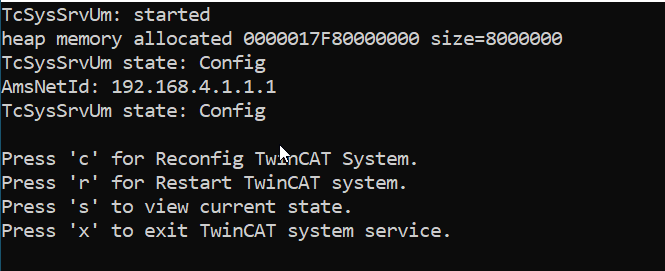
- "c" switches to Config mode
- "r" switches to Run mode
- "s" queries the current state
- "x" exits the TwinCAT 3 Usermode Runtime