Displaying channels in InfoData (Include Channels)
It can be helpful if the controller/PLC knows which channel of an I/O module (terminal, box) it is using. Samples:
- A 4-channel EL3104 analog input terminal is used. A function block (FB) accepts the data in the control unit. The FB expects information on which channel of the EL3104 it is linked to, e.g. the 3rd or 4th channel.
- A module has technologically different channels and the controller expects information on which technology channel it is linked to.
Example: the EL3356 analog bridge terminal works as a 1-channel load terminal in the default setting and outputs the measured weight in kg. Alternatively, it can be reconfigured for 2-channel voltage measurement (supply voltage and bridge voltage). The terminal therefore offers a total of three channels for use (although not all at the same time).
Solution: in TwinCAT 2.11 and 3, the channels of a module can be displayed in the InfoData.
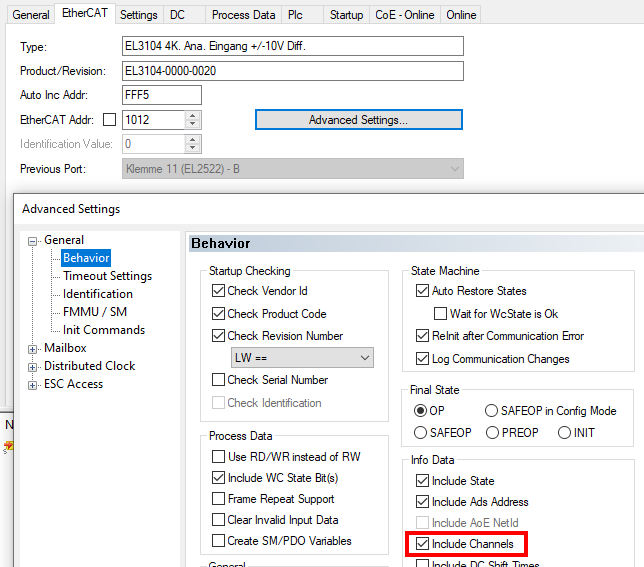 Fig.336: Showing the channels in InfoData via Advanced Settings/Behavior/Include Channels
TwinCAT then displays linkable channels:
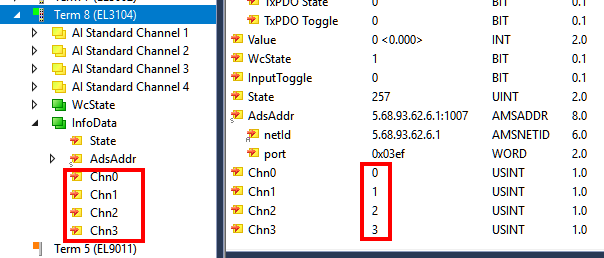 Fig.337: Display of linkable channels in TwinCAT
The content of the bytes is fixed and cannot be changed, namely the consecutive channel number.
Background:
- TwinCAT is based on the profile information in the ESI file → "Profile". Therefore, the channels cannot be activated for modules that do not (yet) have this information in the ESI
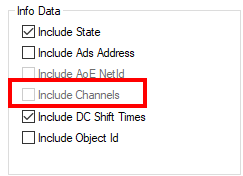
In the Advanced Settings of the EtherCAT master, an informative message is displayed if the channels are activated in one of the slaves.
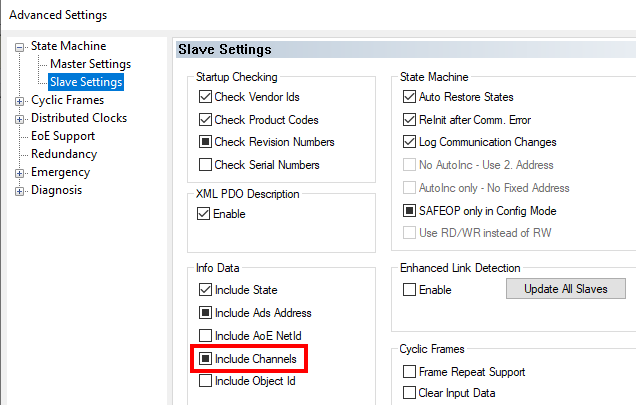 Fig.338: Display of the activation of "Include Channels" in the EtherCAT master