Settings
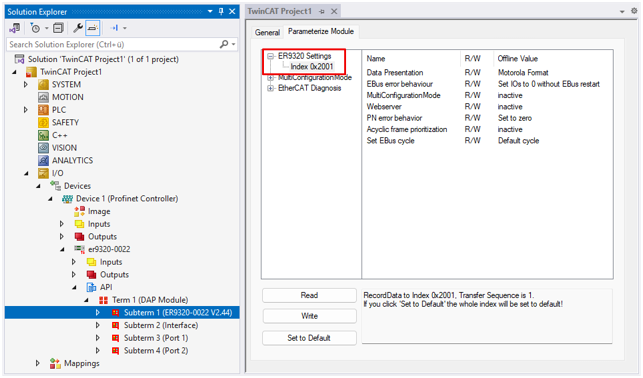
"Data Presentation"
By default, the process data is transmitted in Motorola format. If your controller requires the data in Intel® format, you can reverse the byte order with this setting.
"EBus error behaviour"
See chapter "EBus Error Behavior"
"Set EBus cycle"
If there are problems in the establishment of PROFINET communication when using a higher number of complex terminals on the ER9320-0022, the combination of adjusting the "Set EBus cycle" setting from "Default cycle" (1 ms) to "Profinet cycle" and adjusting the PROFINET cycle time can provide a remedy. It is usually sufficient to set the PROFINET cycle time to 2 ms or 4 ms.
 | PROFINET cycle time and EtherCAT cycle time If the "Profinet cycle" option is activated and the PROFINET cycle time is higher than 64 ms, the EtherCAT cycle will continue to run at 64 ms. This prevents the internal watchdog of the EtherCAT devices from responding (100 ms). If, for example, a PROFINET cycle time of 128 ms is set in the PROFINET controller, the EtherCAT network is operated with a cycle time of 64 ms. |
"MultiConfigurationMode"
See chapter Multi-configuration mode
"Webserver"
See chapter Activating the web page
"PN error behavior"
Defines the behavior in the event of PROFINET errors:
- "Set to zero" (default): All data will be set to "0"
- "Defined fallback": Data is set to a defined value.
- "Frozen": Data is frozen at its current value at the moment of the error.
This setting applies to all channels of the EtherCAT device; a channel-by-channel setting is not possible. - "Stop EBus": No further EtherCAT frames pass through the coupler and its devices. The EtherCAT state machine is in "INIT"
"Acyclic frame prioritization"
If required for the application, you can set a prioritization of the acyclic frames (data set data) here.