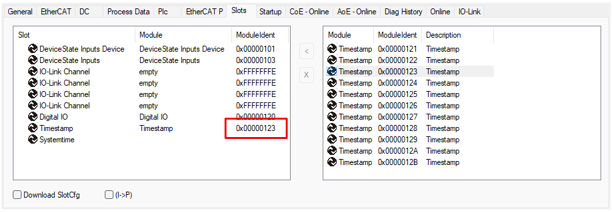
Configuring process data
You can configure the process data of the timestamp inputs to remove any unnecessary information from the process image.
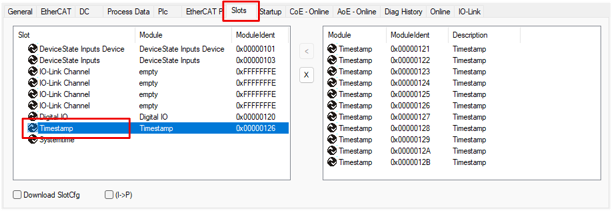
- 1. Open the "Slots" tab and choose the "Timestamp" slot
- 2. Choose the module according to the required process data, see the following table
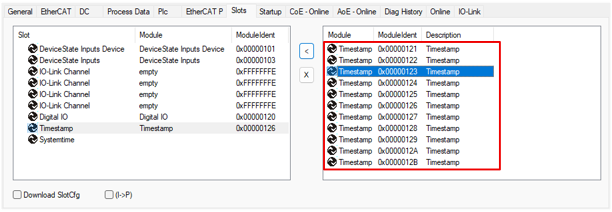
ModuleIdent | Activated process data in the PDO "Module 8 (Timestamp)" |
|---|---|
0x00000121 | Status1, Status2, Status3, Status4 |
0x00000122 | Status1; LatchPos1 |
0x00000123 | Status1; LatchPos1; LatchNeg1 |
0x00000124 | Status1, Status2; LatchPos1, LatchPos2; LatchNeg1, LatchNeg2 |
0x00000125 | Status1, Status2, Status3; LatchPos1, LatchPos2, LatchPos3; LatchNeg1, LatchNeg2, LatchNeg3 |
0x00000126 (Default) | Status1, Status2, Status3, Status4; LatchPos1, LatchPos2, LatchPos3, LatchPos4; |
0x00000127 | LatchPos1, LatchPos2; LatchNeg1, LatchNeg2 |
0x00000128 | LatchPos1, LatchPos2, LatchPos3; LatchNeg1, LatchNeg2, LatchNeg3 |
0x00000129 | LatchPos1, LatchPos2, LatchPos3, LatchPos4; LatchNeg1, LatchNeg2, LatchNeg3, LatchNeg4 |
0x0000012A | LatchPos1, LatchPos2, LatchPos3, LatchPos4 |
0x0000012B | LatchNeg1, LatchNeg2, LatchNeg3, LatchNeg4 |
- 3. Assign the module to the "Timestamp" slot
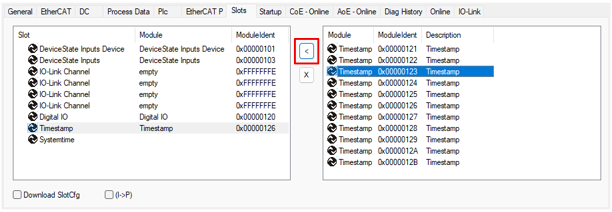
- The ModuleIdent of the selected module is displayed next to the slot