Status LEDs
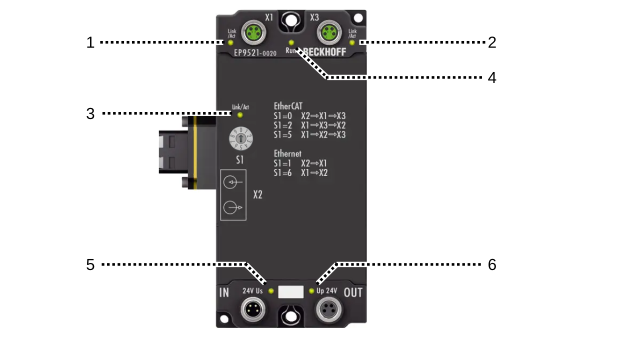
Position | Labeling | Color | Display | Description |
|---|---|---|---|---|
1, 2, 3 | Link/Act | green | off | No connection |
lit | "Link": EtherCAT device connected | |||
flashes | "Active": communication with the connected EtherCAT device | |||
4 | Run | green | off | State of the EtherCAT State Machine: |
single flash | State of the EtherCAT State Machine: | |||
flashes | State of the EtherCAT State Machine: | |||
on | State of the EtherCAT State Machine: | |||
flickers | State of the EtherCAT State Machine: | |||
orange | lit | EtherCAT mode; the rotary switch was moved during operation Remedy: Reset the rotary switch or reset the voltage | ||
red | lit | Ethernet mode; the rotary switch was moved during operation Remedy: Reset the rotary switch or reset the voltage | ||
red/green | flashes | Invalid rotary switch position after switching on Remedy: Move rotary switch to a valid position | ||
5 | 24V Us | green | off | Supply voltage US is not present |
lit | Supply voltage US is present | |||
6 | Up 24V | green | off | Supply voltage UP is not present |
lit | Supply voltage UP is present |