Activating the website
To enable access to the website, activate the web server as follows:
- 1. Set the parameter Webserver to active in the DAP
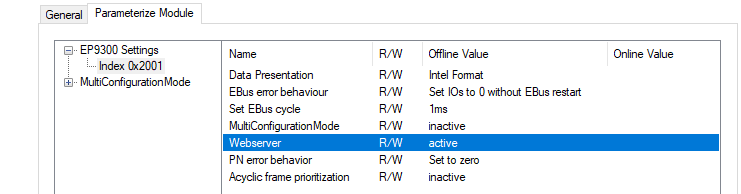
- 2. Connect the EP9300-0022 to the PROFINET controller
- The PROFINET controller assigns an IP address to the EP9300-0022.
- You can access the website using a browser at the following URL:
http://<IP-Adresse>/config
Example:http://192.168.1.10/config
User name: guest
Password: 1
Recommendation: Only use the website for diagnostic purposes; do not change any settings through it. Settings should be configured via the PROFINET controller.
Requirements for accessing the website
- The web server must have been enabled via the EP9300-0022’s DAP.
- The PROFINET controller must have exchanged data with the EP9300-0022 at least once so that the parameters and the IP address have been set on the EP9300-0022. The EP9300-0022 must not subsequently be switched off, as otherwise settings/parameters will not be applied and events in the web server logger will be lost.
- The PC running the browser must be on the same IP segment as the EP9300-0022. If necessary, use the “Ping” command on the PC to check whether the PC can reach the EP9300-0022. If that is the case, you can visit the EP9300-0022 website.
If the “Ping” command fails, check the following: - Has the web server been enabled?
- Was the communication between the PROFINET controller and the EP9300-0022 successful?
- Is the IP address of the PC correct?
 | Recommended browsers We recommend using Chrome™ or Firefox to view this website. |