Status LEDs
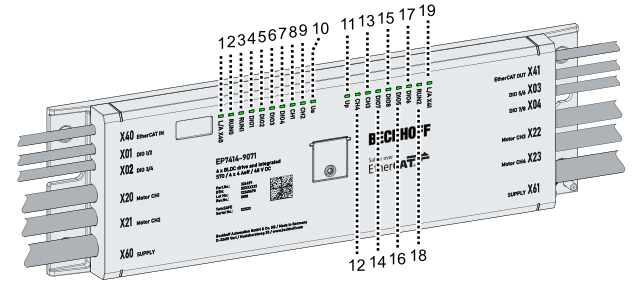
Position | Labeling | Status | Meaning |
|---|---|---|---|
1 | L/A X40 | Lights up green | Link: connection to the preceding EtherCAT device |
Flashing green | Act: communication with the preceding EtherCAT device | ||
2 | RUN0 | 1) | EtherCAT Run-LED for the safety card |
3 | RUN1 | 1) | EtherCAT Run-LED for motor channels 1+2 |
4 | DIO1 | Lights up green | High level on digital combi channel 1 (X01, pin 4) |
5 | DIO2 | Lights up green | High level on digital combi channel 2 (X01, pin 2) |
6 | DIO3 | Lights up green | High level on digital combi channel 3 (X02, pin 4) |
7 | DIO4 | Lights up green | High level on digital combi channel 4 (X02, pin 2) |
8 | CH1 | Off | Axis switched off |
Lights up green | Axis in control | ||
Lights up red | Axis Errors | ||
Lights up yellow | Warning active + axis in control | ||
Flashes yellow | Warning active + axis not in control | ||
9 | CH2 | Off | Axis switched off |
Lights up green | Axis in control | ||
Lights up red | Axis Errors | ||
Lights up yellow | Warning active + axis in control | ||
Flashes yellow | Warning active + axis not in control | ||
10 | Us | Lights up green | The supply voltage US is available. |
11 | Up | Lights up green | The supply voltage UP is available |
12 | CH4 | Off | Axis switched off |
Lights up green | Axis in control | ||
Lights up red | Axis Errors | ||
Lights up yellow | Warning active + axis in control | ||
Flashes yellow | Warning active + axis not in control | ||
13 | CH3 | Off | Axis switched off |
Lights up green | Axis in control | ||
Lights up red | Axis Errors | ||
Lights up yellow | Warning active + axis in control | ||
Flashes yellow | Warning active + axis not in control | ||
14 | DIO7 | Lights up green | High level on digital combi channel 7 (X04, pin 4) |
15 | DIO8 | Lights up green | High level on digital combi channel 8 (X04, pin 2) |
16 | DIO5 | Lights up green | High level on digital combi channel 5 (X03, pin 4) |
17 | DIO6 | Lights up green | High level on digital combi channel 6 (X03, pin 2) |
18 | RUN2 | 1) | EtherCAT Run-LED for motor channels 3+4 |
19 | L/A X41 | Lights up green | Link: connection to the following EtherCAT device |
Flashing green | Act: communication with the following EtherCAT device |
1) See following table
EtherCAT Run
The EtherCAT Run LEDs signal the current operating status of the EtherCAT devices.
Status | Operating status |
|---|---|
Lights up | Operational |
Flashes evenly | Pre-Operational |
Flashes sporadically | Safe-Operational |
Flashes very quickly | Boot |
Off | Init |
A description of the operating states can be found in the "EtherCAT | System Description": Link.