Setting the operation mode
By factory setting, the operation mode CSP is active. You can change the operation mode as follows:
- 1. The choice of operation mode is made using parameter 0x6060/0x6860, Modes of operation Ch.1/Ch.2.
Value | Operation mode | Description |
|---|---|---|
-125dec | Drive motion control | |
8dec | Position control | |
9dec | Velocity control | |
11dec | Cyclic synchronous torque mode with commutation angle (CSTCA) | Torque control with commutation angle |
- 2. Enable the process data for the selected operation mode. To do this, select the appropriate predefined PDO assignment in the Process Data tab:
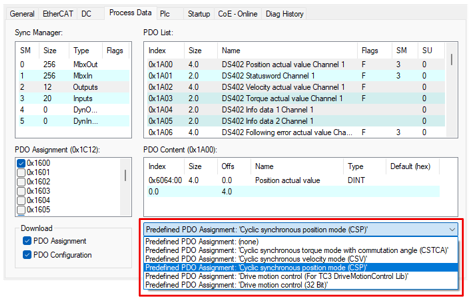
 | Channel-by-channel operation mode setting The choice of a predefined PDO assignment applies to all channels of the selected EtherCAT device. If you want to use different operating modes for different channels of the same EtherCAT device, you must manually enable the required process data. |