Position controller
Configure the position controller as follows:
- 1. In the Solution Explorer, select the entry "Motion > NC-Task 1 SAF > Axes > Axis 1 > Ctrl".
- 2. Open the tab "NC-Controller".
- 3. Select "Position controller with two P constants (with Ka)"
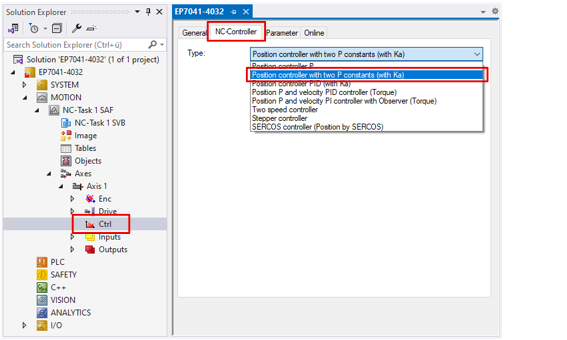
- 4. Open the tab "Parameter".
- 5. Set the following parameters:
"Position Lag Monitoring"
Notice | |
Risk of material damage due to incorrect configuration If you set limit values that are too high, devices, machines and peripheral parts may be damaged. |
Position lag monitoring is activated ex factory. You can configure it with two parameters:
- "Maximum Position Lag Value" is the amount of the maximum permissible following error in [Inc] (encoder increments).
To convert this value into an angle or a distance, you must multiply it by the "Scaling factor", see chapter Encoder. - "Maximum Position Lag Filter Time" is the maximum permissible time span for which the following error may be outside the "Maximum Position Lag Value".
If this time span is exceeded, the motor is stopped and an error message is issued.
"Position Control: Dead Band Position Deviation"
If a target position lies between two scanning points of the encoder during position control, the position error (control deviation) is always greater than zero. In this case, the controller continues to control endlessly; the axis constantly moves in small movements around the target position.
You can solve this problem by specifying a tolerance in the parameter "Position Control: Dead Band Position Deviation" within which the position error is interpreted as zero.
Controller parameters
The P controller "Position controller with two P constants (with Ka)" used in these instructions has two parameters for the P component. Depending on the operating state, only one of these parameters is used:
- During standstill, starting and stopping: "Position Control: Proportional Factor Kv (standstill)"
- In motion: "Position Control: Proportional Factor Kv (moving)"
For stepper motors, you can usually enter the same factor in both parameters.
If you enter different values, you can use the parameter "Position control: Velocity threshold V dyn [0.0 … 1.0]" to specify the threshold value in % at which the switchover between the P components takes place. Example:
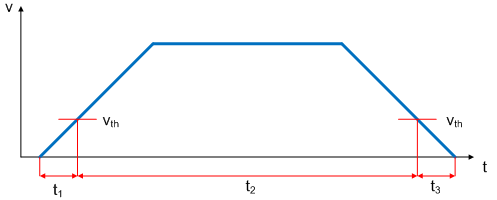
During times t1 and t3, the Kv factor "standstill" is active; at t2, the Kv factor "moving" is active.