Process data objects EP7041-4032

The EP7041-4032 device contains the process data for the stepper motor.

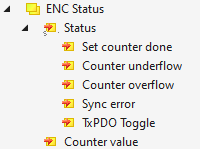
ENC Status

Process data objects EP7041-4032 1:

Set counter done
Confirms the successful setting of the internal counter. (Triggered by "ENC Control > Control > Set counter").

Counter underflow
Is set to 1 if the counter falls below the value 0.

Counter overflow
Is set to 1 if the counter exceeds the maximum value.

Sync error
This bit is only relevant in operation with distributed clocks.
It has the value 1 if a synchronization error occurred in the previous EtherCAT cycle.

TxPDO Toggle
This bit is inverted each time the process data object "ENC Status" is updated.

Counter value
Position according to internal step counter.

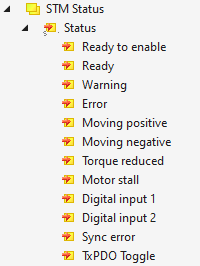
STM Status

Process data objects EP7041-4032 2:

Ready to enable
Signals that the axis can be enabled. This bit is 0 if the "Error" bit has the value 1.

Ready
The axis is enabled, the output stage is activated and the motor phases are energized.

Warning
Warning message. Possible reason e.g.: incorrectly set supply voltage 8010:03 "Nominal voltage".

Error
Error message. The output stage has been deactivated due to an error.
If the error has been rectified, you can acknowledge the error message with a positive edge on the "STM Control > Control > Reset" bit.

Moving positive
The motor is currently being driven in the positive counting direction.

Moving negative
The motor is currently being driven in the positive counting direction.

Torque reduced
Reduced torque is active. The coil current is reduced to the value of 8010:02 "Reduced current".
See also chapter Motor.

Motor stall
A loss of step has occurred.

Digital input 1
Logic level of the digital input at X01.

Digital input 2
Logic level of the digital input at X02.

POS Status

See chapter Commissioning with the Positioning Interface.

ENC Control

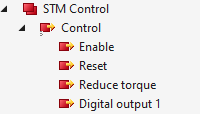
STM Control

Process data objects EP7041-4032 3:

Enable
Enables the axis and activates the output stage. Prerequisite: the bit "STM Status > Status > Ready to enable" is 1.
A successful enable is signaled by the bit "STM Status > Status > Ready" and green illumination of the "ENA" LED.
Notice Configure the motor before enabling. See chapter Motor.

Reset
Acknowledges all pending error messages from the box. Errors are reported via the bit "STM Status > Status > Error".

Reduce torque
Reduces the torque. The coil current is set to the value of parameter 0x8010:02 "Reduced current".

Digital output 1
Controls the motor brake (connection X03).

STM Velocity


Velocity

Target speed, related to parameter 8012:05 "Speed range".

POS Control

See chapter Commissioning with the Positioning Interface.

POS Control 2

See chapter Commissioning with the Positioning Interface.