Restore the delivery state
EtherCAT devices have two options for restoring the delivery status:
- Function reset ("load"): Resets changeable CoE parameters to their default values.
This procedure is typically used during commissioning. - Data reset ("wipe"):
Deletes all user-specific data completely.
This procedure is intended for a complete reset, e.g. when decommissioning.
Function reset ("load")
You can restore the delivery status of all changeable CoE parameters with the function reset ("load") as follows:
- 1. Ensure that TwinCAT is in the CONFIG or RUN state and that EtherCAT communication is running error-free.
- 2. In CoE object 1011:0, "Restore default parameters" select parameter 1011:01."Subindex 001"
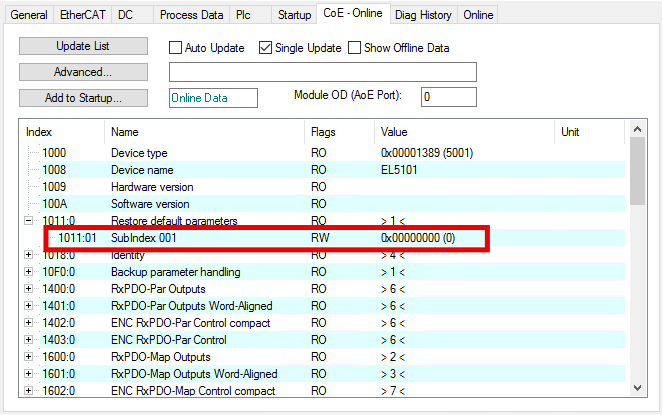
- 3. Double click on "Subindex 001".
- The dialog box "Set Value Dialog" opens.
- 4. Enter the value 1684107116 in the field "Dec".
Alternatively, enter the value 0x64616F6C in the field "Hex".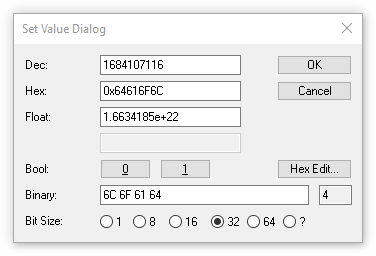
For some EtherCAT devices with firmware version before approx. 2007, the value 1819238756 is required instead.
Alternatively, enter the value 0x6C6F6164 in the field "Hex". - 5. Confirm with "OK".
- All changeable CoE parameters are reset to the default values.
Exception: CoE parameters that are protected by a write protection password.
Properties of the function reset ("load"):
- Depending on the EtherCAT devices, execution takes a few milliseconds to over 1 second.
- The execution is not confirmed.
- Entering an incorrect value has no effect.
- Depending on the device, individual CoE parameter values are not reset.
- Existing checksums for the parameter ranges will change.
Data reset ("wipe")
Proceed as for the function reset ("load"), but enter the value 2003398757 in the "Dec" field; alternatively, enter the value 0x77697065 in the "Hex" field.
Result:
- All user-specific data is deleted completely:
- CoE
- SoE
- FoE
- Register values
- User memory
- Password protected data is also reset
- The following data will not be reset:
- firmware
- EtherCAT revision
- persistent diagnostic data such as the object 0x1020 "Device Statistics", operating hours counter, peak values
- manufacturer adjustment data