Range error
Overrange/Underrange
This functional unit monitors the measured value for exceeding or falling below the nom. FSV, for example to -10.0 V and +10.0 V in the “±10 V” measuring range.
Parameterization is not possible. The measured value is not limited.
Result | |
|---|---|
PDO AI Status | Overrange bit Underrange bit |
Range Error
The Range Error functional unit monitors the measured value according to 2 limit values (min. and max.), counts overrange/underrange, and reports them as an error (error bit in the status). There is no limitation of measured values.
In the default setting, the RangeError limit values are set to negative and positive technical FSV, e.g. to LowRangeError = -10.7 V and HighRangeError = +10.7 V in the “±10 V measuring range: exceeding the limit is then output as an error in the PDO status and LED.
Note: The limit values according to 0x80nD can be changed in the operation modes “Integer PDO, Extended Range” and “Real32 PDO”; in the operation mode “Integer PDO, Legacy Range”, the limit values cannot be changed and are 0x7FFF/32767 or -32768; the limit values according to 0x80nD are not taken into account.
Index [data type] | Name |
|---|---|
0x80nD:17 [DINT] | Low Range Error |
0x80nD:27 [REAL32] | Low Range Error (REAL32) |
0x80nD:18 [DINT] | High Range Error |
0x80nD:28 [REAL32] | High Range Error (REAL32) |
Notice | ||
 | Changing the interface or IntegerScaler 0x80nD:12 When changing the interface or IntegerScaler 0x80nD:12 (“Extended/Legacy Range”), the limit values are reset to the default setting according to the interface! | |
Result | |
|---|---|
PDO AI Status | Error bit |
0x90n0:14 | Underrange Error Counter |
0x90n0:15 | Overrange Error Counter |
Resetting to the default setting according to the interface is done by
- an interface change
- or setting to de-energized [(re-)power cycle]
- or the command x302n to index 0xFB00:01 (channel 1: n = 0, channel 2: n = 1, ...).
During execution, “Status” 255 “busy” is displayed in index 0xFB00:02, “0” means “successfully completed”, - and the command x3001 “Reset all counters”
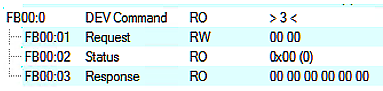
During command execution, “Status” 255 “busy” is displayed in index 0xFB00:02, “0” means “successfully completed”.
The firmware responds to an unknown command with
