Automatic configuration via the configuration interface/extension
The EL6695 extension with the [Create configuration] button makes the created variables readable online on the other side, so that they do not have to be created explicitly there. This function is recommended for mapping a comprehensive process image and is only available via the [EL6695] plug-in. In addition, the EL6695 must be ready for operation from both sides, i.e. accessible "online". The procedure for TwinCAT 3, in which variables created on the primary side are automatically "mirrored" on the secondary side, is shown below:
- Precondition: TwinCAT is in "Free-Run"/ "Config Mode" (see symbol at the bottom right
 ,
,  ), an EL6695 is located on the primary side under a "Device" (term)
 - A) Variables have been created on the primary side (e.g. 10 input and 12 output variables):
- B) The terminal is marked on the primary side; with the [Create configuration] button under "Process Data" in the [EL6695] tab, a "mirrored" set of variables is now created for the other side, in this case the secondary side, internally within the terminal; it is therefore not yet visible at this point
- C) The successful completion of this action is acknowledged accordingly:
- D) The primary side must now be set once via INIT to PreOp and OP.
- E) The next steps take place on the secondary side. In order for the terminal to take over the data of the variables through an internal initialization, the terminal must be read in again via a scan process on the device of the secondary side. It may be in Error PreOp status because the PDOs of the primary and secondary sides do not match. It must be moved manually to the PreOp status - not to OP - so that the StartUp list is not sent. For this reason, FreeRun must not be activated.
- F) For the further procedure, the object directory structure of the terminal must first be transferred to TwinCAT. This is done via the [CoE - Online] tab via the choice "Advanced..." and the following steps (1 and 2), as shown:
- G) Under the [Process Data] tab, the "mirrored" variable configuration is generated from the other side using [Load PDO info from device] and is then visible in the "Solution explorer" (left):
- H) If necessary, reload the configuration using "Reload Devices" (
 ) in the TwinCAT menu and enable FreeRun
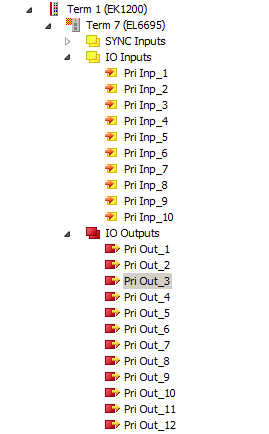 Fig.140: Example of variables created on the primary side of the EL6695
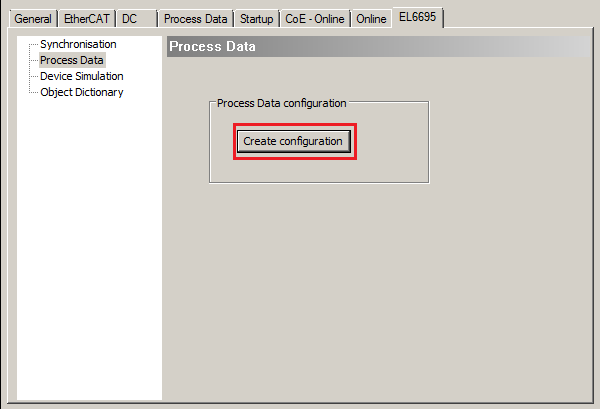 Fig.141: [Create configuration] under “Process Data” in the EL6695 tab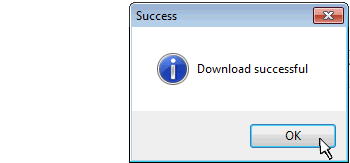

 Fig.142: Loading the object directory structure from the terminal
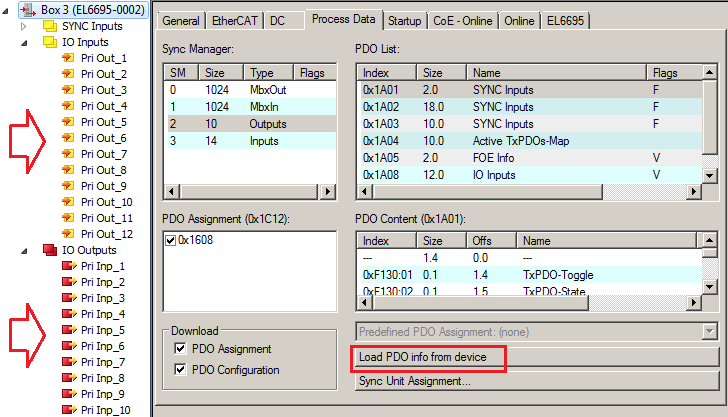 Fig.143: Transfer variables from the primary side to the secondary side in mirrored form using "Load PDO info from device"
In accordance with the process shown here, variables can also be generated automatically for the primary side if an I/O variable set, i.e. a PDO configuration, exists on the secondary side.
Variable Restrictions
The following PDO/variable types are to be used for this procedure:
Byte, UINT, UDINT
Use without TwinCAT
If no TwinCAT EtherCAT master with [Load PDO info from device] is available on the other side, the PDO upload mechanism must be replicated there:
- read PDO assignment objects 0x1C12, 0x1C13
- then read the PDO mapping objects 0x160x (outputs), 0x1A0x (inputs) and
- read the PDO 0x60xx, 0x70xx
 | If scanning is not possible/not desired To generate the variables here without a scan on the secondary side, the terminal on the primary side must be manually set to the INIT state and then back to the OP state after [Create configuration], steps B) and C) ("Online" tab: click on Init, then: Safe-Op, Pre-Op, OP). The corresponding variant of the EL6695 (-0002) can then be inserted on the secondary side instead of a scan using "addItem". Otherwise the procedure is as described above from E). |
| Using the sample programs This document contains sample applications of our products for certain areas of application. The application notes provided here are based on typical features of our products and only serve as examples. The notes contained in this document explicitly do not refer to specific applications. The customer is therefore responsible for assessing and deciding whether the product is suitable for a particular application. We accept no responsibility for the completeness and correctness of the source code contained in this document. We reserve the right to modify the content of this document at any time and accept no responsibility for errors and missing information. |
→ Example configuration: symmMap_cfg2