Creating general process data / simple data exchange (symmetric PDO mapping)
Procedure:
Right-click on IO Inputs or IO Outputs within the EL6695 directory tree to show the context menu. Select Insert Variable… (TwinCAT 2) or Add New Item (TwinCAT 3) to create new variables / process data (see figure below).
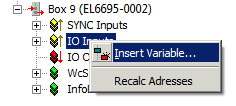 Fig.136: Context menu for IO Inputs: Inserting new variables
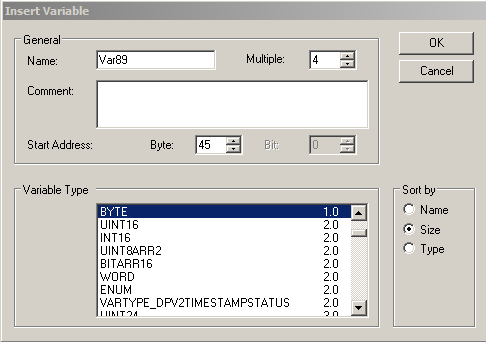 Fig.137: Dialog for adding new variables (here 4 x BYTE), beginning with the name Var89
In this dialog a name can now be assigned for the variable, and the data type can be selected from a wide range of possible types. Several variables of the same type can be declared simultaneously via the Multiple selection box, and a defined start address can be set. Once the above dialog is confirmed, the process image shown below appears.
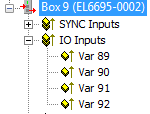 Fig.138: Newly added variables on the secondary side of the EL6695
The variable names are incremented automatically, as shown here. Output variables are created accordingly.
On the primary side, i.e. the “remote side” of the EL6695, four suitable output variables of the same type should now be created for the data exchange. These variables do not have to have the same name, i.e. they can be called Var85 to Var88.
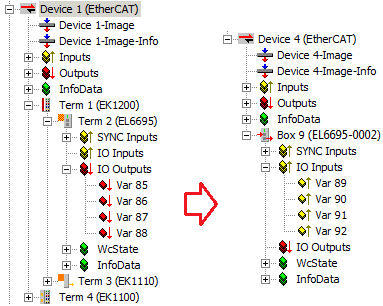 Fig.139: Creating process data
If 4 x BYTE variables have been added to the outputs on the primary side of the EL6695 here too, all values are output continuously via the four input variables, once the variables have been written, e.g. via a PLC program. If, for example, a value is written into variable Var86, the same value is written to the corresponding output variable Var90 in the mapping of the remote side of the EL6695 (as long as the terminal is in OP state).
Transmission direction from two controllers PLC1 to PLC2
The bridge terminal is generally used to transfer data between two controllers. Since the bridge maps an output as an input and an input as an output, the following transmission method results:
- Output (PLC1) → Output EL6695
 Input EL6695-0002 remote side → Input (PLC2)
 - Input (PLC1) → Input EL6695 Output EL6695-0002 remote side → Output (PLC2)
The EL6695 bridge terminal "maps" an output value to an input value and vice versa in byte sequence (without any additional configuration or settings). The data types must therefore be the same on every side.