Introduction
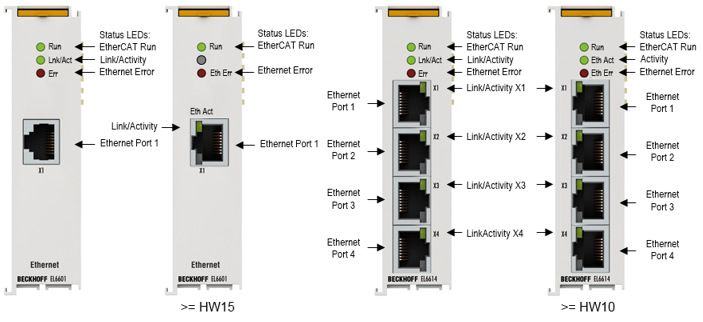 Fig.4: EL6601, EL6614
EtherCAT Terminals, communication interface, Ethernet switch port
The switch terminals for Ethernet are used for decentralized connection of any Ethernet devices to the EtherCAT Terminal network. The Ethernet communication of the connected devices is forwarded by the EtherCAT system in a fully transparent and collision-free manner.
The EL6614 4-port Ethernet switch terminal forwards the incoming frames from the ports specifically to the target ports. In full duplex mode, it thus enables collision-free communication of the connected devices with each other.
Any number of EL6601/EL6614 devices can be used simultaneously and at any position in the EtherCAT Terminal network. No configuration is required. In conjunction with the network port at the EtherCAT master the EL6601/EL6614 devices operate like a virtual switch whose ports are distributed in the field. The EtherCAT fieldbus is the backbone of this switch.
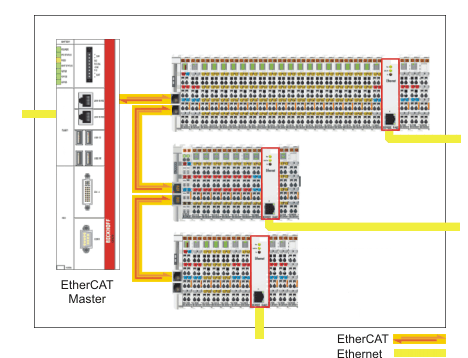 Fig.5: EL6601 as a virtual, field-distributed switch
Further benefits underline the particular suitability for the application in industrial environments:
- Compact design in EtherCAT Terminal housing
- 10/100 MBaud, half or full duplex, with automatic baud rate detection
- Autocrossing (automatic detection of cross-over cables)
LED
LED | Color | Meaning | |
|---|---|---|---|
RUN | green | These LEDs indicate the terminal's operating state: | |
off | State of the EtherCAT State Machine: INIT = initialization of the terminal or BOOTSTRAP = function for terminal firmware updates | ||
flashing | State of the EtherCAT State Machine: PREOP = function for mailbox communication and different default settings set | ||
Single flash | State of the EtherCAT State Machine: SAFEOP = verification of the Sync Manager channels and the distributed clocks. | ||
on | State of the EtherCAT State Machine: OP = normal operating state; mailbox and process data communication is possible | ||
Link / Act | green | Connection / data exchange fieldbus | |
*Link/Act X1 - X4 | green | Connection / data exchange Ethernet port X1- X4 | |
Eth Err | red | Error message EtherCAT (see Diagnostics) | |
* only EL6614 | |||
Connections
1 x RJ45 with 10BASE-T/100BASE-TX Ethernet (EL6601)
4 x RJ45 with 10BASE-T/100BASE-TX Ethernet (EL6614)