Contact assignment and LEDs
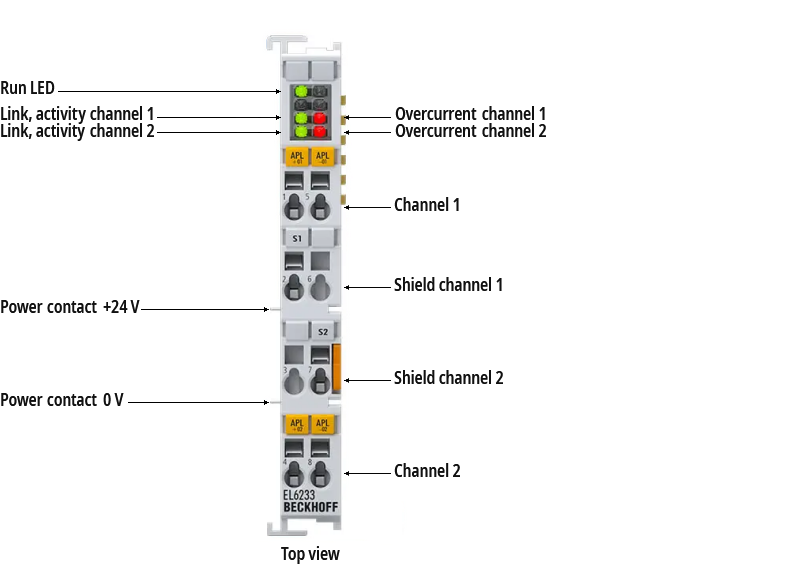 Fig.1: EL6233 | Connection and LEDs
EL6233 | Connection
Terminal point | Description | |
|---|---|---|
Name | No. | |
APL+01 | 1 | Signal channel 1 |
S1 | 2 | Screen channel 1 |
| 3 | not used |
APL+02 | 4 | Signal channel 2 |
APL-01 | 5 | Signal channel 1 |
| 6 | not used |
S2 | 7 | Screen channel 2 |
APL-02 | 8 | Signal channel 2 |
EL6233 | LED displays
LED | Color | Meaning | |
|---|---|---|---|
Run | green | This LED indicates the terminal's operating state: | |
off | State of the EtherCAT State Machine: INIT = initialization of the terminal or BOOTSTRAP = function for terminal firmware updates | ||
flashing | State of the EtherCAT State Machine: PREOP = function for mailbox communication and different default settings set | ||
single flash | State of the EtherCAT State Machine: SAFEOP = verification of the Sync Manager channels and the distributed clocks. | ||
on | State of the EtherCAT State Machine: OP = normal operating state; mailbox and process data communication is possible | ||
Link/Act Ch1 | green | Link/Activity channel 1 | |
Overcur. Ch1 | red | Overcurrent channel 1 | |
Link/Act Ch2 | green | Link/Activity channel 2 | |
Overcur. Ch2 | red | Overcurrent channel 2 | |