Appending PROFINET devices
Select Append Box by right-clicking on the protocol. The following dialog then opens:
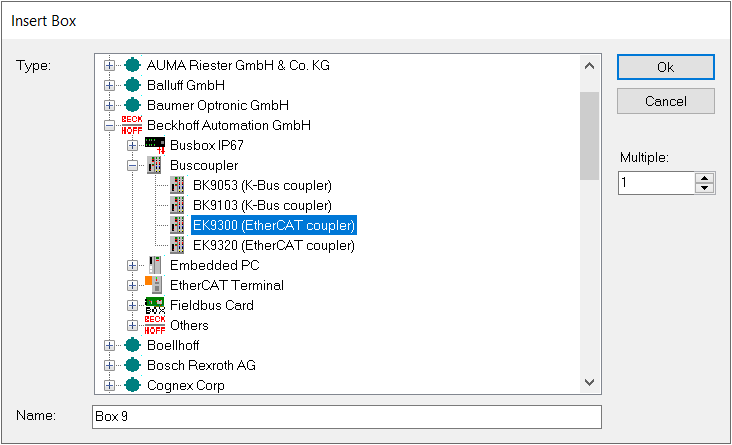 Fig.32: Insert Box dialog
Here you can select different PROFINET devices. For Beckhoff devices, the GSDML is searched for under a defined path:
“..\TwinCAT\IO\PROFINET” (TC2) or
“..\TwinCAT\3.1\Config\Io\Profinet” (TC3).
These should be already present with the TwinCAT installation. If there are several GSDMLs for the same device here, the one with the latest date is taken. If no device description is found, a corresponding error message appears. Either the GSDML is copied into the folder and the menu is opened again, or the same procedure is selected as for the third-party devices. If you click on PROFINET IO Device, an option is offered to navigate to the corresponding GSDML in Windows Explorer. This is then integrated into the project.
The DNS name from the GSDML is taken as the default name. When appending several devices simultaneously, the default name is always supplemented by “-No.” (where No. = 1...n). The name that was assigned (and with which the device also appears in the tree), is at the same time also the “PROFINET Station Name”, i.e. the name that must correspond to the name in the device. The device name can be checked by scanning.
The modules can be appended to the API (Application Profile Interface). The DAP (Device Access Point), which already brings along fixed properties from the GSDML (e.g. process data, interface and port submodules, etc.), is always on Slot 0.
This module is always there and cannot be deleted or shifted. Each further module is assigned to a certain API. The information regarding its identity comes from the GSDML. By default this is always API 0. Alternatively, an API e.g. for the PROFIDRIVE profile or a fieldbus API is also conceivable. By clicking in the API on Append PROFINET modules… a device catalog is opened from which the corresponding modules can be selected and appended. If the modules support it (described in GSDML), the submodules can in turn be appended to them in the same way.