Analysis of the box states
There is a collective PROFINET error and a collective PROFINET state directly under the PROFINET controller protocol. Both show the number of devices for which a problem has occurred or for which a diagnosis is available. The error indicates possible problems with the connection establishment or reasons for a termination. The diagnosis provides state information about an existing connection.
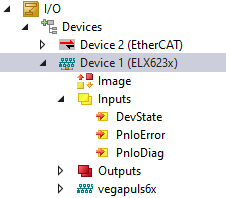 Fig.27: TwinCAT tree - Inputs for analysis
PnIoError - Number of PROFINET IO devices that have an error
PnIoDiag - Number of PROFINET IO devices that have a diagnosis pending
It is possible to check at a glance which device or box has a problem in the protocol under Box States.
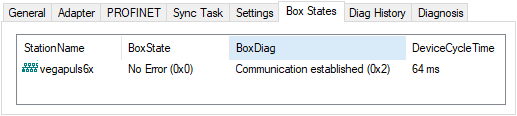 Fig.28: Box States tab
The following error messages are currently displayed via the PnIoState.
Number | Text | Description | Remedial action / reason |
|---|---|---|---|
0 | No error | No error | No error |
1 | PROFINETDevice state machine is in boot mode | PROFINET Device StateMachine is in boot mode | Not an error, wait |
2 | Device not found | Device does not reply to the Identify Request | Check connection, device connected, has the device been given the correct name? |
3 | The station name is not unique | The station name is not unique | There are two or more devices with the same PROFINET name in the network. |
4 | IP could not set | IP address could not be set | The PROFINET device has refused to set the IP settings for some reason. |
5 | IP conflict | An IP conflict has occurred in the network | A possible cause is that several devices have the same IP address. |
6 | DCP set was not successful | There was no reply or an erroneous reply to a DCP set | Check connection, device connected, has the device been given the correct name? |
7 | Watchdog error | The connection was interrupted with a watchdog error | Check the cycle time, check the connection, if necessary increase the Watchdog factor. |
8 | Datahold error | The connection was interrupted with a Datahold error | Frame Data state was invalid for the length of the DataHoldTimer. Restart the device if necessary. |
9 | RTC3: Sync signal could not started | Only for IRT: The Sync signal could not be started. | Is EtherCAT Sync signal correct or has Sync0 started? |
10 | PROFINET Controller has a link error | The PROFINET Controller has no link | Check cable and connection. |
11 | The alias name is not unique | The alias name is not unique | There are two or more devices in the network with the same alias name. This is made up of the neighborhood information (PortId.ChassisId). A correct identification cannot take place. |
12 | The automatic name assignement isn't possible - wrong device type | The automatic name assignment isn't possible | The expected PROFINET device is not in the projected position (VendorId or DeviceId does not correspond). Hence, no automatic naming and thus no device start is possible. |
31 | Only for EtherCAT gateways: WC-State of cyclic EtherCAT frame is 1 | Only for EL6631: EtherCAT WC State is set to 1 | Check the mode on the EtherCAT master + slave (OP?). |
As opposed to the State, more than one state can be displayed in the BoxPnIoDiag, i.e. the whole thing is bit-coded and up to 16 pieces of information can be displayed. The following states are currently displayed.
0x0000 = No diagnosis
0xXXX1 = IOC-AR is not established
0xXXX2 = IOC-AR is established
0xXXX4 = IOC-AR is established but no ApplReady
0xXXX8 = IOC-AR is established but module difference
0xXX1X = At least one AlarmCR get diagnosis alarm
0xX1XX = At least one InputCR is invalid
0xX2XX = At least one InputCR Provider is in stop
0xX4XX = At least one InputCR Problemindicator is set
0x1XXX = At least one OutputCR is invalid
0x2XXX = At least one OutputCR Provider is in stop
0x4XXX = At least one OutputCR Problemindicator is set
On the one hand information about the state of the IO Controller Single AR is displayed here. In addition, collective states are formed from the Frame Data states of the individual CRs. This applies to the input and output CRs (currently only one CR is possible, in future several). A PROFINET alarm is also displayed in PnIoDiag.
Readout via ADS
The Box Status can be read out via an ADS Read.
ADS Read:
NetId = AMSNETID des PROFINET Controllers
Port = BoxPort (0x1000 + BoxId)
Indexgroup = 0xF829
IndexOffset = 0
Length = sizeof(TPnIoDeviceDiagData);
where:
typedef struct
{
WORD pnioState;
WORD pnioDiag;
WORD NrOfInputCRs;
WORD NrOfOutputCRs;
WORD reserved[8];
} TPnIoDeviceDiagData, *PTPnIoDeviceDiagData;