EL3174-0030 - Connection, display and diagnostics
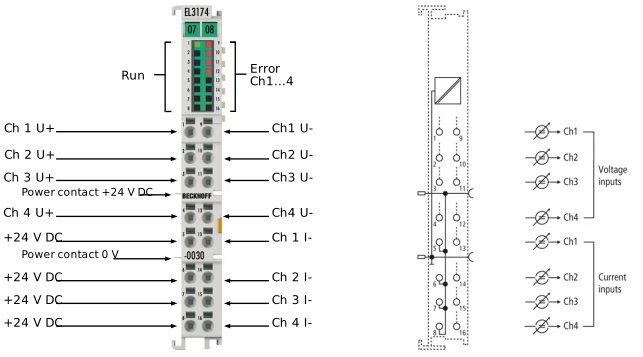 Fig.77: EL3174-0030 - LEDs and connection
EL3174-0030 connection
Terminal point | Description | Internally connected with connection | Max. current carrying capacity *) | |
|---|---|---|---|---|
Name | No. | |||
Ch1 U+ | 1 | Channel 1, voltage measurement, positive input (U+) | - | not applicable (voltage inputs) |
Ch2 U+ | 2 | Channel 2, voltage measurement, positive input (U+) | - | |
Ch3 U+ | 3 | Channel 3, voltage measurement, positive input (U+) | - | |
Ch4 U+ | 4 | Channel 4, voltage measurement, positive input (U+) | - | |
+24 V DC | 5, 6, 7, 8 | +24 V | Positive power contact | 1 A |
Ch1 U- | 9 | Channel 1, voltage measurement, negative input (U-) | - | not applicable (voltage inputs) |
Ch2 U- | 10 | Channel 2, voltage measurement, negative input (U-) | - | |
Ch3 U- | 11 | Channel 3, voltage measurement, negative input (U-) | - | |
Ch4 U- | 12 | Channel 4, voltage measurement, negative input (U-) | - | |
Ch1 I- | 13 | Channel 1, current measurement, input (I) | - | 40 mA |
Ch2 I- | 14 | Channel 2, current measurement, input (I) | - | 40 mA |
Ch3 I- | 15 | Channel 3, current measurement, input (I) | - | 40 mA |
Ch4 I- | 16 | Channel 4, current measurement, input (I) | - | 40 mA |
*) Constant and peak value | ||||
 | Overcurrent protection of the 20 mA inputs The current inputs are protected against damage by overcurrent by an internal current limitation, currents > 30 mA may occur.
|
EL3174-0030 LEDs
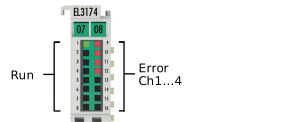 Fig.79: EL3174-0030 - LEDs
LED | Color | Meaning | |
|---|---|---|---|
RUN* | green | These LEDs indicate the terminal's operating state *: | |
off | State of the EtherCAT State Machine: INIT = initialization of the terminal or BOOTSTRAP = function for terminal firmware updates | ||
flashing | State of the EtherCAT State Machine: PREOP = function for mailbox communication and different default settings set | ||
Single flash | State of the EtherCAT State Machine: SAFEOP = verification of the Sync Manager channels and the distributed clocks. | ||
on | State of the EtherCAT State Machine: OP = normal operating state; mailbox and process data communication is possible | ||
ERROR** | red | Error indication in the event of a wire break or when the measuring range is exceeded or not reached | |
*) If there are several RUN-LEDs, they all have the same function. | |||