EL2522 - For predefined PDOs with “Continues position” when using older firmware- or older TwinCAT versions
 | Note on use with older firmware and TwinCAT versions If you are using older versions of the firmware and TwinCAT versions, you may need to perform the following steps in “Continuous Position Mode.” |
- Update of the NC driver
- Add axes to the NC
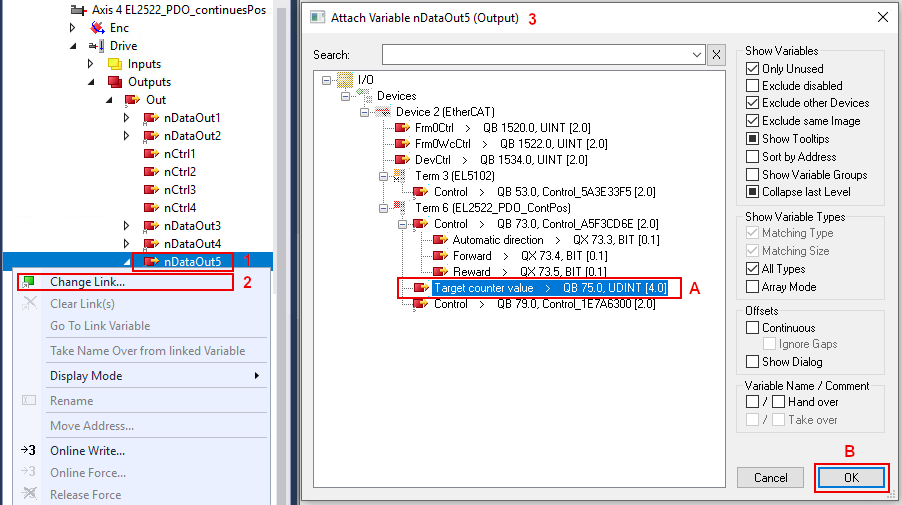
The link from Axis/Drive/nOutData5 to the terminal's “Target counter value” was not created automatically. Create a link:
- 1. Click with the right mouse button on “nDataOut5” and
- 2. select “Change Link” (see the figure below).
- 3. In the “Attach Variable nDataOut5 (Output)” dialog box , select the “Target counter value” variable and click “OK” (see A and B in the figure below).
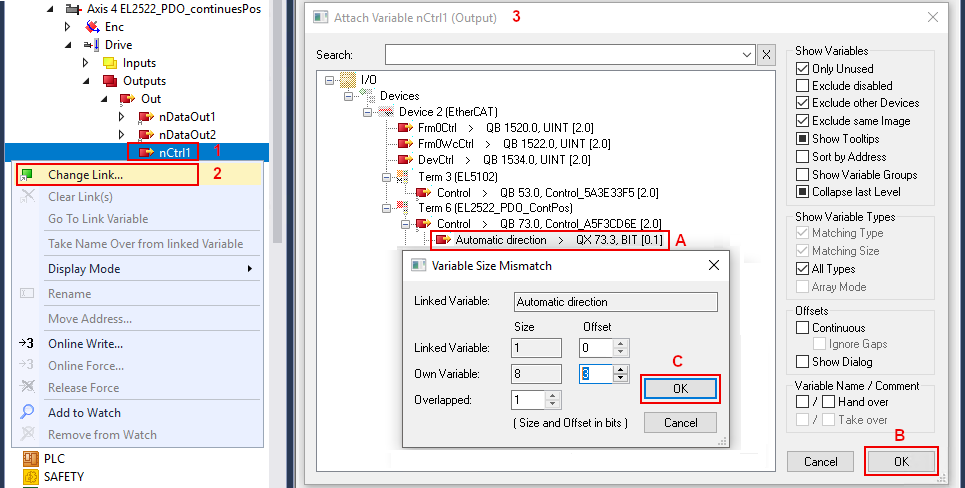
The link from Axis/Drive/nCtrl1 to the terminal's “Automatic direction” was not created automatically. Create a link:
- 1. Click with the right mouse button on “nCtrl1” and
- 2. select “Change Link” (see 2 in the figure below).
- 3. In the “Attach Variable nCtrl1 (Output)” dialog box , select the “Automatic direction” variable and click “OK” (see A and B in the figure below).
- 4. The following “Variable Size Mismatch” dialog box displays the 1-bit overlap. Set an offset of 3 bits.
- Confirm by clicking “OK” (see C in the figure below.)