Device synchronization (Sync manager, distributed clocks)
The EL2521-xxxx can be synchronized via
- the EtherCAT cycle, so-called “SM-Synchron” (Sync Manager)
- Distributed clocks (for availability see table Operation Modes)
Distributed clocks (DC)
 | EtherCAT and distributed clocks You can download a basic introduction to EtherCAT and distributed clocks from the Beckhoff website (see the EtherCAT system manual, chapter “I/O Synchronization via Distributed Clocks”). |
The EL2521 supports the distributed clocks functionality. In order for the EL2521 to be able to make the current process data available in time before the arrival of the querying EtherCAT datagram, a suitable signal must be generated cyclically within the terminal. This signal can be triggered in the EL2521 by two events: the SyncManager (SM) and the Distributed Clocks (DC). Under operation mode selection the following options are available (see Fig. “DC tab”):
- FreeRun/SM-Synchron
The SyncManager event occurs when an EtherCAT frame successfully exchanges process data with the EL2521. Frame-triggered, the current process data are thus processed cyclically, but with the low temporal jitter of the Ethernet frame. - DC-Synchron
In the DC operation mode, process data processing is constantly triggered cyclically by the integrated DC unit, synchronous with the bus cycle as standard. More uniform polling offers higher-quality data for a higher-level control algorithm, for example. In the EL2521 the SYNC0 signal acts as trigger.
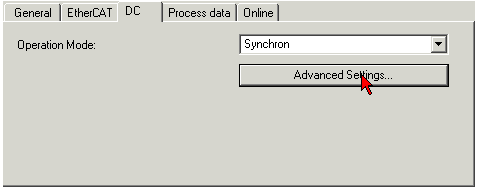
When “DC-Synchron” operation mode is activated TwinCAT selects settings that ensure reliable operation of the EL2521 with current data. This means that the processing of the current process data is started by the SYNC0 signal at highly constant intervals and in good time – i.e. with an adequate safety buffer – before the retrieving EtherCAT datagram.
If necessary, the SYNC0 signal can be shifted along the time axis to the right/later or left/earlier in associated dialogs by specifying a “User defined Shift Time”, see Fig. “Advanced settings distributed clocks (DC) settings, EL2521 Terminal”.
- Through a shift to the right (positive shift value), the processing of the process data takes place later – regarded relatively from the PLC the degree of currentness is thus increased. However, this increases the risk that the provision may not be finished in time before the arrival of EtherCAT frame, so that no current value is available in this cycle.
- Through a shift to the left (negative shift value) the processing of the process data takes place earlier – the degree of currentness is thus decreased; however, the safety buffer is increased before the arrival of the EtherCAT datagram. This setting may be useful in systems with high real-time jitter, if no industrial PCs from Beckhoff are used for control purposes, for example.
Notice | |
Attention! Risk of device damage! The mentioned notes and information should be used advisedly! The SYNC0 and SYNC1 settings are automatically configured by the EtherCAT master with values that support reliable and timely process data acquisition. User intervention at this point may lead to undesired behavior! If these settings are changed in the System Manager, no plausibility checks are carried out on the software side! Correct function of the terminal with all conceivable setting options cannot be guaranteed! |
EL2521 DC settings
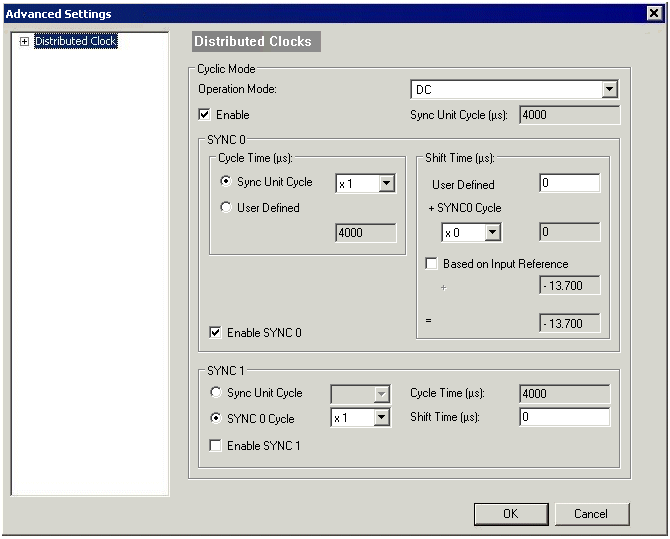
- “SYNC0”
Sync Unit Cycle: Multiple of the bus cycle time. The process data are periodically processed at this interval (in µs). - “User defined”
Arbitrary number up to 232 ns ≈ 4.3 s. Decimal point values are possible. - “Shift Time”
The Shift Time can be used to shift the SYNC0 pulse for this EL2521 relative to other terminals and the global SYNC pulse in nanosecond steps. If the outputs of multiple EL2521 Terminals are to be written at the same time, the same value must be entered here. - “Based on Input Reference”
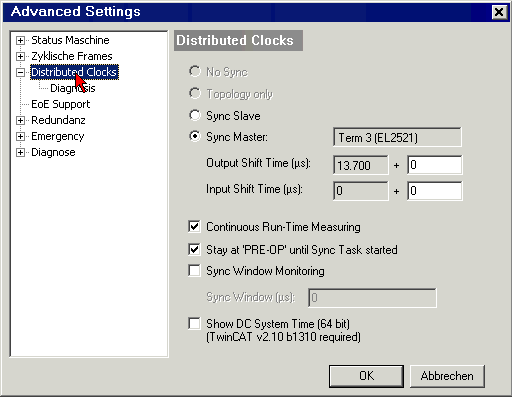
If this option is activated an additional “Input Shift” is added to the configurable terminal-specific SYNC0 shift (“User defined”). This value is calculated and made available by the EtherCAT master (SysMan/Solution Explorer → device (EtherCAT): EtherCAT tab → advanced settings → distributed clocks → Input Shift Time, see corresponding figures). As a result, all the input terminals in the system (EL1xxx, EL3xxx) read their inputs as close as possible to the time of the EtherCAT frame that will fetch them, thereby supplying the most recent possible input data to the controller. - “Enable SYNC0”
Automatically activated in “DC-Synchron” operation mode. - “SYNC1”
Additional SYNC pulse, derived from SYNC0 or from the DC itself. Not required for the EL2521.
Default setting
The cyclic writing of the outputs is triggered by the SYNC0 pulse (interrupt) from the DC in the EL2521. The EtherCAT master sets the “Sync Unit Cycle” time value to the PLC cycle time and therefore the EtherCAT cycle time as standard. According to figure “Advanced settings distributed”: 4000 µs = 4 ms because TwinCAT is in Config mode.
DC settings for EtherCAT master
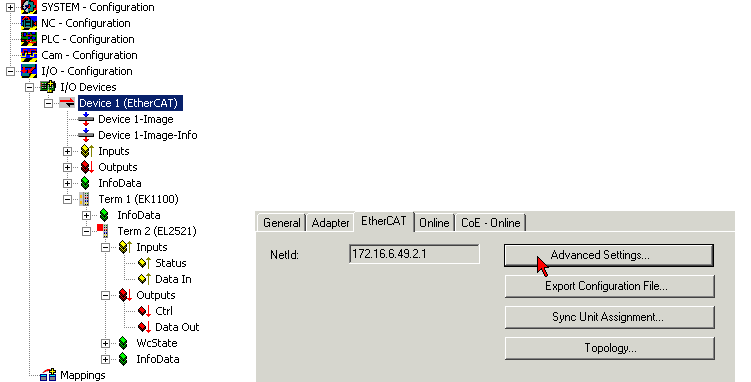
Higher-level distributed clocks parameters can be modified under advanced settings for the EtherCAT master. See also basic introduction into EtherCAT and downloading distributed clocks: “Distributed clocks system description”.