Creating a Drive Manager 2 project
Proceed as follows to create the project:
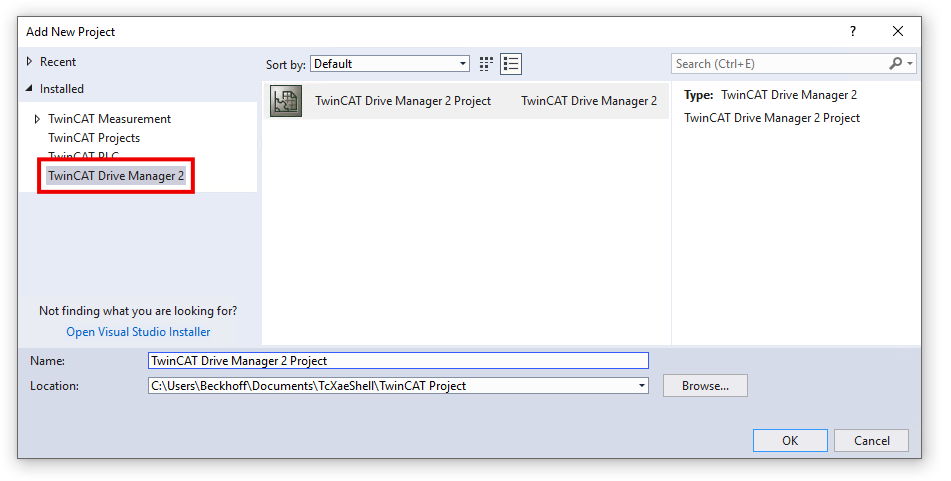
- 1. Select the menu item File > Add > New Project in TwinCAT
- A dialog box opens.
- 2. Select “Installed” > “TwinCAT Drive Manager 2” in the dialog box on the left-hand side and click on OK
- If the TwinCAT project contains multiple EtherCAT masters, the following dialog box appears:
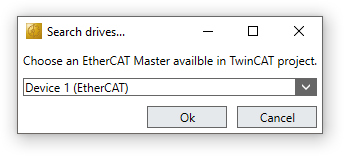
Select the EtherCAT master to which the ED7062 is connected - A dialog box opens.
- 3. Set the motor supply voltage in the dialog box and click on “OK”.
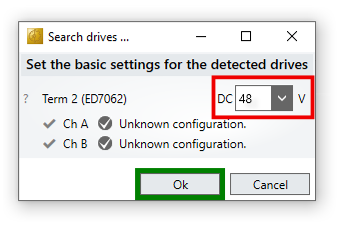
- The project was created.
- The ED7062 was integrated into the project.