Optimization of the position controller
The position controller is a P-controller.
Optimization of the proportional component Kv
The optimization of the proportional component is analogous to the optimization of the proportional component of the velocity controller.
- 1. Open the “Run motor” menu and select the “Position controller” tab under “Drive Parameters”
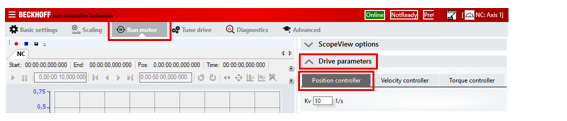
- 2. Increase the Kv value step by step, meanwhile, watch the Scope View
- At a certain value of Kv the motor starts to oscillate
- 3. Reduce Kv again until the motor no longer oscillates
- 4. Reduce Kv a bit more, depending on the application
- The position controller is optimized.
Velocity pre-control
The velocity pre-control improves the control behavior especially during acceleration and braking.
It routes part of the position setpoint past the position controller and directly to the velocity controller.
- 1. Select the menu "Tune Drive"
- 2. Click on "Position Controller" in the controller structure
- 3. Set the parameter K in the "Feed forward velocity" field