Settings of the IO-Link devices
To find the basic settings of the devices for each port, proceed as follows.
- 1. Select the port and click on the “Settings” button to open the “Port n:: Settings” tab, in which the settings described below can be made.
- 2. Information
This field is for information only; the IODD that was read is displayed under “Device Description”. Furthermore, the ‘”Vendor ID”, “Device ID” and the “IO‑Link Revision” (V 1.0 or V 1.1) of the IO-Link devices are displayed. If the device is an IO‑Link V 1.1 device, then the parameter server function is supported.
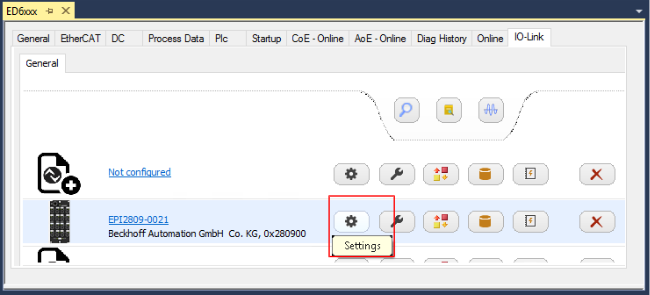 Fig.34: Open device settings using the example of EPI2809-0021 on port 2
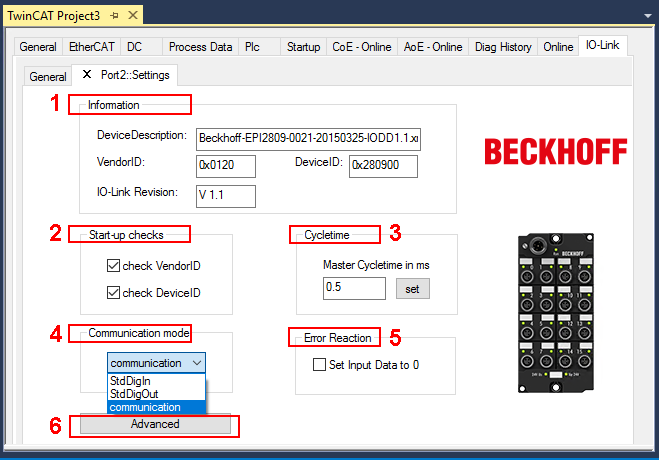 Fig.35: Settings of the IO-Link devices
The following settings can be configured in the “Settings” tab (see figure above):
- 3. Start-up checks
This parameter can be used to specify that the Vendor ID and Device ID should be checked when the IO-Link device starts up. - This avoids errors when replacing IO-Link devices.
- 4. CycleTime
Specifies the cycle time of the IO-Link master. - 5. Communication mode
Selection of the mode in which the IO-Link port is to be operated. - “Communication”: Default mode for IO-Link devices
- “StdDigIn / StdDigOut”: Mode for non-IO-Link devices, automatically selected if the port is configured as a digital input or output
- 6. Error Reaction
If the “Set Input Data to 0” field is activated - input data is set to 0 in case of error
- status display: “Error”
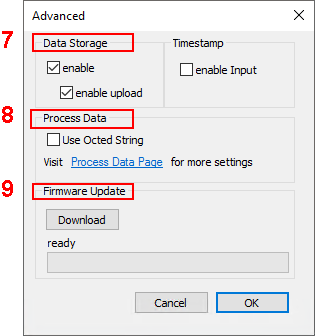
- 7. “Advanced” button
|
|
| |
|