Range Warning
Range Warning
The Range Warning functional unit monitors the measured value according to 2 limit values (min. and max.), counts overrange/underrange and reports this as an warning (Warning bit in the status). There is no limitation of measured values.
In the default setting, the Range Warning limit values are set to negative and positive full scale value, e.g. in the "±10 V" measuring range to LowRangeWarning = -10.7 V and HighRangeWarning = +10.7 V, exceeding the limit is then output as an error in the PDO status and LED.
Index | Name |
|---|---|
80nD:2D | Low Range Warning |
80nD:2E | High Range Warning |
Notice | ||
 | Changing the interface or IntegerScaler If you modify interface 0x80nD:11 or IntegerScaler 0x80nD:12 (Extended/Legacy Range), the limit values will be reset to the default settings specified in the interface! | |
Result | |
|---|---|
PDO AI Status | Error bit |
90n0:1D | Underrange Warning Counter |
90n0:1E | Overrange Warning Counter |
Resetting to the default setting according to the interface is done by
- an interface change
- or a de-energized setting [(re-)power cycle]
- or the command x302n to index FB00:01 (channel 1: n=0, channel 2: n=1, ...).
During execution, "Status" 255 "busy" is displayed in index FB00:02, "0" means "successfully completed" - and the command x3001 "Reset all counters"
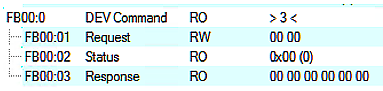 Fig.25: CoE Index FB00, DEV Command
During command execution, "Status" 255 "busy" is displayed in index FB00:02, "0" means "successfully completed".
The firmware responds to an unknown command with
 Fig.26: General parameter incompatibility reason, 0x06040043