Hardware error diagnostics
Hardware errors are logged via a collective diagnostic.
The warning and error thresholds can be found in object 0xF816, “PWM Vendor Data”.
The CoE object 0xFA16 “PWM Diag Data” displays the currently measured values.
Error messages are displayed via the “Dev Error“-LED”, in the process data under “PWM Input Device” via the “PWM-Warning” and “PWM Error” bits, and via the DiagMessages (see the following table).
Diagnostics | CoE values | Process data | DiagMessages |
|---|---|---|---|
Dev error-LED lights up red | |||
Warning | Currently measured value “External Supply Voltage” 0xFA16:13 < 4.75 V, warning threshold 0xF816:14 “External Supply Voltage Warning Level” | 0xF616:06 | 0x4601 Warning |
Warning | Currently measured value “PCB Temperature” 0xFA16:12 > 80.0°C, warning threshold 0xF816:12 “PCB Temperature Warning Level” | – | |
Error | Currently measured value “External Supply Voltage” 0xFA16:13 < 4.5 V, error threshold 0xF816:15 “External Supply Voltage Error Level” | 0xF616:07
| 0x8601 Error |
Error | Currently measured value “PCB Temperature” 0xFA16:12 > 100.0°C, error threshold 0xF816:13 “PCB Temperature Error Level” | – | |
Error | No supply voltage or insufficient supply voltage “Up Supply voltage available” 0xFA16:03 = FALSE | 0x810B Error | |
Error | – | 0x8144 Error | |
The Dev error-LED is not lit | |||
There are no warnings or error messages. | The values are within the acceptable range. | 0xF616:06 0xF616:07 | – |
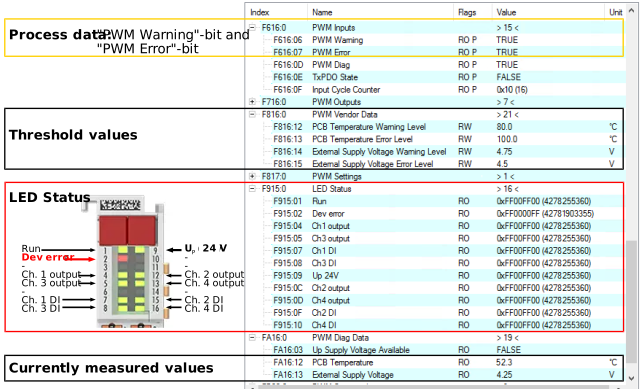 Fig.34: Hardware error diagnostics