Replace the fan cartridge
 | Service life The fan cartridge must be replaced every 5 years. Spare fan cartridges can be ordered from Beckhoff Service. |
Replace the fan cartridge of the CX20x2 if:
- the fan cartridge has been in use for 5 years
- or the fan speed is less than 1000 rpm.
In a CX20x2 Embedded PC, the fan speed is controlled dependent on the temperature.
Temperature | Fan control | Fan speed |
|---|---|---|
up to 30°C | 30% | 3400 rpm |
30 °C … 75 °C | 30% … 100%, controlled linearly | 3400 rpm ... 6000 rpm, controlled linearly |
above 75 °C | 100% | 6000 rpm |
Use the IPC diagnostics and monitor the fan speed to detect a fan fault.
Access to the fan status is described in the IPC diagnostics documentation:
https://download.beckhoff.com/download/Document/ipc/industrial-pc/Beckhoff-Device-Manager_en.pdf
To replace the fan cartridge, follow these instructions:
- 1. Open the front flap.
- 2. Pull the old fan cartridge out of the housing.
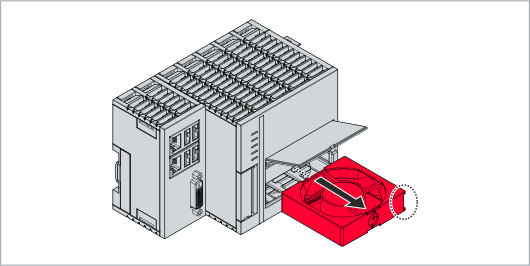
- 3. Push the new fan cartridge into the housing with the contacts first.
The guide rails on the fan match the guide rails in the housing.
- Close the front flap. You have successfully replaced the fan cartridge if the fan starts running again.