Wake on LAN (WOL)
Wake on LAN (WOL) allows you to turn on your device remotely when it receives a special network signal. WOL is enabled by default in Beckhoff standard images. You can configure this function in the operating system.
The following device does not support the WOL function:
- CP77xx-xxxx-0050
Configuration under Windows
To configure the Wake on LAN function, follow these steps:
- 1. Open the Device Manager.
- 2. Navigate to the Network adapters section.
- 3. Double-click the appropriate Ethernet controller.
- A window containing the Ethernet controller's properties will open.
- 4. Klick on the Advanced tab.
- 5. Set the Wake on Magic Packet and Wake on Magic Packet from S5 properties to Enabled.
- 6. Confirm with OK.
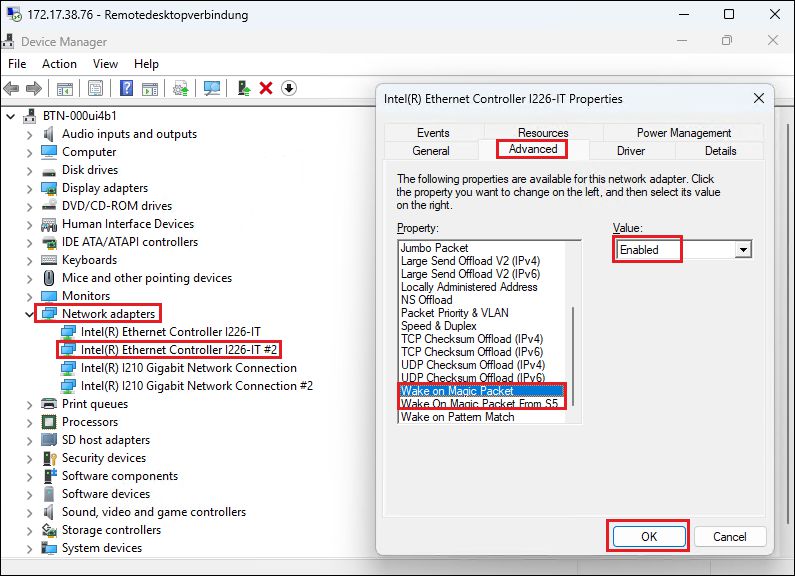 Fig.10: Activate function
- 7. Click the Power Management tab.
- 8. Check the box next to Allow this device to wake the computer.
- 9. Confirm with OK.
- You have configured the Wake on LAN function.
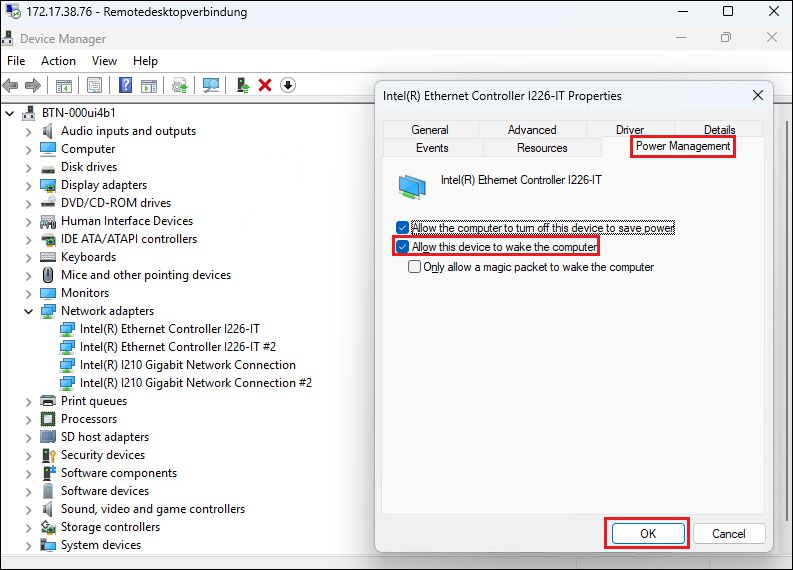 Fig.11: Enable Function