Wake on LAN (WOL)
Wake on LAN (WOL) allows you to turn on your device remotely when it receives a special network signal. WOL is enabled by default in Beckhoff standard images. You can configure this function in the operating system.
Configuration under Windows
To configure the Wake on LAN function, follow these steps:
- 1. Open the Device Manager.
- 2. Navigate to the Network adapters section.
- 3. Double-click the appropriate Ethernet controller.
- A window containing the Ethernet controller's properties will open.
- 4. Klick on the Advanced tab.
- 5. Set the Wake on Magic Packet and Wake on Magic Packet from S5 properties to Enabled.
- 6. Confirm with OK.
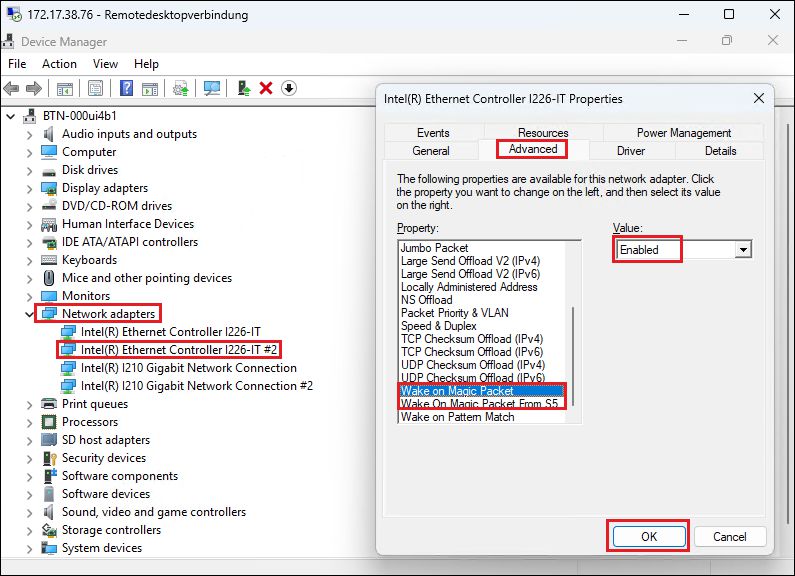 Fig.31: Activate function
- 7. Click the Power Management tab.
- 8. Check the box next to Allow this device to wake the computer.
- 9. Confirm with OK.
- You have configured the Wake on LAN function.
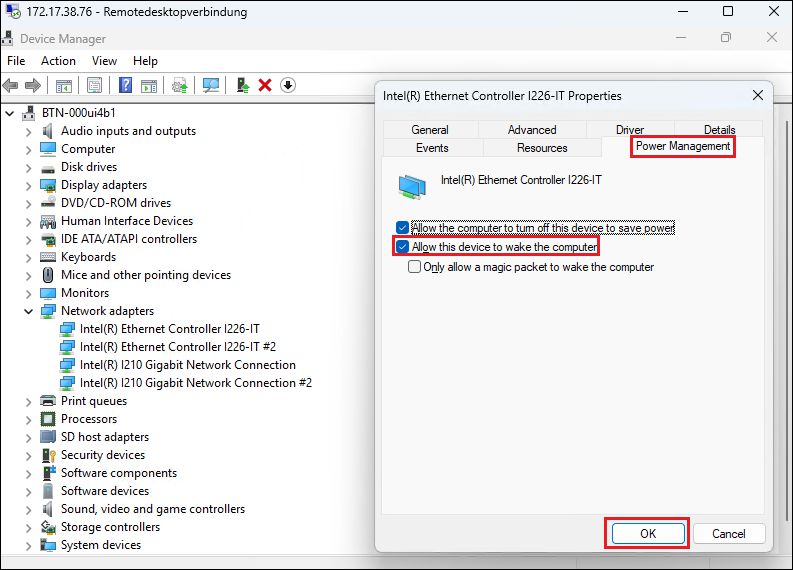 Fig.32: Enable Function