Ethernet RJ45
The panel PC has an Ethernet RJ45 interface (X102) in the form of a push-pull Ethernet built-in socket. The 100Base-T and 1000Base-T Ethernet standards enable the connection of corresponding network components and data rates of 100/1000 Mbit/s. The required speed is selected automatically.
The RJ45 connection technology with twisted-pair cables is used. The maximum length of the cable connection is 100 m.
The Intel® i219 is used as controller. The Ethernet port is suitable for real-time Ethernet applications with cycle times > 1 ms (without distributed clocks).
(Reference options)
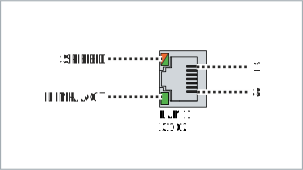 Fig.4: Ethernet interface pin numbering
Pin | Signal | Description |
|---|---|---|
1 | T2 + | Pair 2 |
2 | T2 - | |
3 | T3 + | Pair 3 |
4 | T1 + | Pair 1 |
5 | T1 - | |
6 | T3 - | Pair 3 |
7 | T4 + | Pair 4 |
8 | T4 - |
The LEDs of the LAN interfaces indicate the activity and the data transmission rate (Mbit/s). The LED (LINK/ACT) highlighted completely green in the figure indicates whether the interface is connected to a network. If this is the case, the LED lights up green. The LED flashes green when data transmission is in progress on the interface.
The green/orange LED (SPEED) shown in the figure indicates the data transmission rate. The following table shows the LED meaning according to the possible data transmission speed:
Mbit/s | LED |
|---|---|
100 | Lights up orange |
1000 | Lights up green |