Installing power supply cable
Before you can connect the power supply, you must install the power supply line yourself. For this purpose, use the supplied material for connector assembly. This consists of the 5-pin connector and the strain relief housing with cable tie.
Mounting the supply line
First mount the plug on the cable as follows:
- 1. Remove the insulation from the cable ends (8-9 mm).
- 2. Screw the cable ends into the connection strip. For the pin assignment of the connector, see Chapter Power supply.
- You have fitted the supply line to the plug.
Assembly of strain relief housing
Now fit the strain relief housing to the already connected plug and supply line:
- 1. Thread the cable tie into the lower part of the strain relief housing (section A).
- 2. Insert the connection strip into the lower part of the strain relief housing (section B).
- 3. Tighten the cable tie and cut off the plastic tab (section C).
- 4. Attach the upper part of the strain relief housing by snapping it onto the lower part (section D).
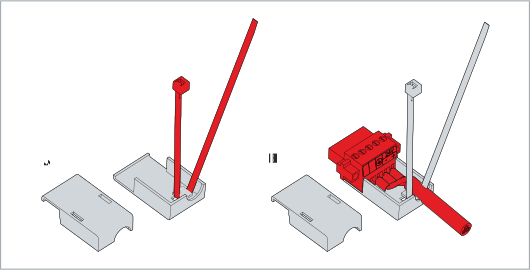 Fig.23: Mounting lower part of strain relief housing
- You have mounted the strain relief housing.
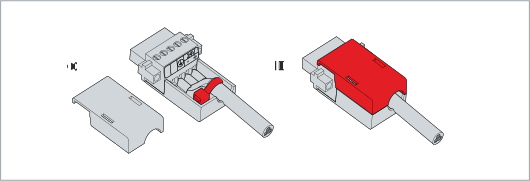 Fig.24: Mounting upper part of strain relief housing
To dismantle the strain relief housing, proceed as follows:
- 1. Use your fingers to bend the latching lugs on the lower part slightly outwards.
- 2. Lever the upper part off the lower part.
- 3. Cut the cable tie.
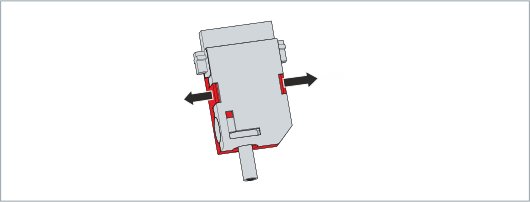 Fig.25: Disassembly of the strain relief housing
- You have dismantled the strain relief housing.