Optional USB interface
You can expand the device beyond the basic configuration with an additional USB interface. The following ordering options are available:
- USB (order identifier: C9900-E268)
The ordering option is not available for the device in combination with a push-button extension or a stainless steel front.
The interface is mounted ex factory. It is located at the bottom right in the front of the device behind a cover. To make the interface accessible, follow the steps below:
- 1. Press against the bulge on the right side of the cover (section A).
- The cover protrudes slightly from the left side of the device.
- 2. Turn the cover down (section B).
- The USB interface is now accessible.
- 3. Turn the cover back again.
- 4. Press the bulge again.
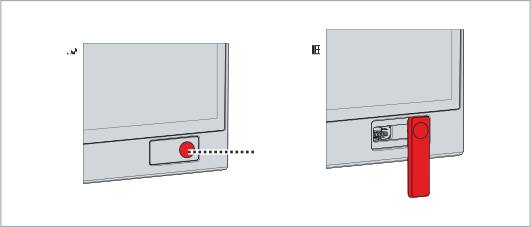 Fig.17: Access optional interface
- The cover is locked again.
The interface is used to connect peripheral devices with USB connection. This is a USB-A socket with IP65 protection. The USB specification 2.0 is supported.
 Fig.18: CP29xx_optional USB interface
Pin | Assignment |
|---|---|
1 | Vbus |
2 | D - |
3 | D + |
4 | GND |