Ethernet RJ45
The panel PC has two Gigabit LAN ports (X108, X109).
The 100Base-T, 1000Base-T, and 2500Base-T Ethernet standards enable the connection of corresponding network components and data rates of 100/1000/2500 Mbit/s. The required speed is selected automatically.
The RJ45 connection technology with twisted-pair cables is used. The maximum length of the cable connection is 100 m.
The controllers are used as follows, based on the device generation:
Device generation | Controller | Mbit/s |
|---|---|---|
CP27xx-0010 | Intel® i219 for LAN1 and Intel® i210 for LAN2 | 100/1000 |
CP27xx-0020 | Intel® i219 for LAN1 and Intel® i210 for LAN2 | 100/1000 |
CP27xx-0030 | Intel® i226 for LAN1 and LAN2 | 100/1000/2500 |
The Ethernet port (X109, LAN2) connected via PCIe® with the i210/i226 controller is suitable for cycle times <= 1 ms and for distributed clock applications with EtherCAT.
The Ethernet port (X108, LAN1) integrated into the chipset is suitable for real-time Ethernet applications with cycle times > 1 ms (without distributed clocks).
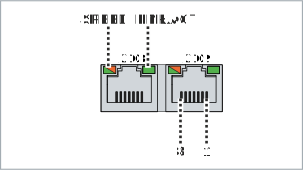 Fig.7: Ethernet interface pin numbering
Pin | Signal | Description |
|---|---|---|
1 | T2 + | Pair 2 |
2 | T2 - | |
3 | T3 + | Pair 3 |
4 | T1 + | Pair 1 |
5 | T1 - | |
6 | T3 - | Pair 3 |
7 | T4 + | Pair 4 |
8 | T4 - |
The LEDs of the LAN interfaces indicate the activity and the data transmission rate (Mbit/s). The LED shown completely green in the figure indicates whether the interface is connected to a network. If this is the case, the LED lights up green. The LED flashes green when data transmission is in progress on the interface.
The green/orange LED shown in the figure indicates the data transmission rate. The device generations differ in terms of the possible data transmission rate. The following tables show the LED meanings according to the possible data transmission rate.
Mbit/s | LED |
|---|---|
100 | Lights-up orange |
1000 | Lights up green |
Mbit/s | LED |
|---|---|
100 | Off |
1000 | Lights-up orange |
2500 | Lights up green |