Disassembly and disposal
Before you can remove the device from the control cabinet, you must first disconnect the power supply and the cables (see Chapter Disconnecting the power supply and cables).
To remove the device from the control cabinet, follow the steps below:
- 1. Loosen the clamping levers with a 3.0 mm Allen key (sections A and B). Make sure that the device is secured against falling out until it is removed from the wall.
- 2. Turn the clamping levers by 90° onto the device (section C).
- 3. Remove the device from the corresponding cutout in the control cabinet wall.
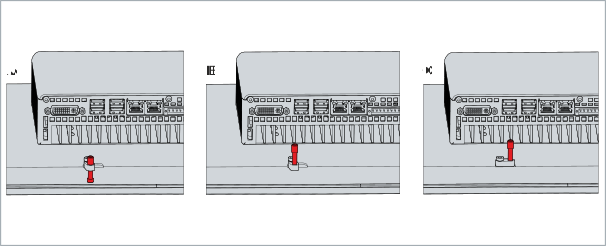 Fig.24: Dismantling the control cabinet
- You have successfully removed the device from the control cabinet.
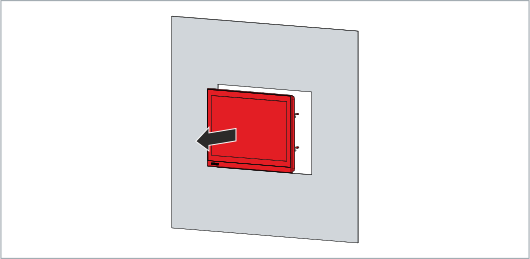 Fig.25: Wall removal
Disposal of the panel PC
When disposing of the device follow the national electronic scrap regulations. In order to dispose of the device, it must be removed and fully dismantled. Dispose of the components in the following way:
- Send plastic parts (polycarbonate, polyamide (PA6.6)) for plastics recycling.
- Take metal parts to the metal recycling collection point.
- Electronic parts such as fans and circuit boards must be disposed of in accordance with national electronic scrap regulations.
- Stick insulating tape over the poles of the CR2032 battery on the motherboard and dispose of the battery via the local battery recycling.