Replacing the fan
Notice | |
Incorrect fan type The device may be damaged if the wrong type of fan is installed.
|
The fans ensure optimal cooling of the device. Order replacement fans only from Beckhoff. Please get in touch with your Beckhoff sales contact.
First, make sure you have access to the fans (see section 7.2 Maintenance).
Exchange fans, bottom
To replace the fans on the bottom of the device, follow the steps below:
- 1. Remove the two M3 screws from the fans. Make sure that the fans are secured against falling down (section A).
- 2. Disconnect the fan supply cables from the circuit board with the MXM slot and pull them out of the cable grommets.
- 3. Remove the fans (section A).
- 4. Pull the supply cables of the new fans through the cable grommets, then route them through the slot on the right side of the heat sink (section B).
- 5. Plug the fan supply cables into the board with MXM slot.
- 6. Mount the new fans using two M3 screws with a tightening torque of 0.5 Nm.
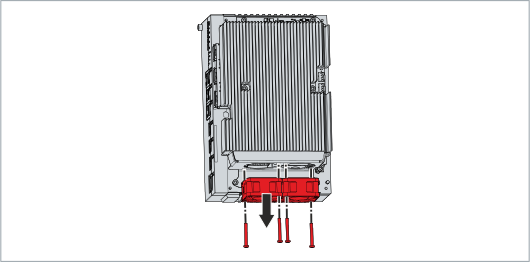 Fig.32: Exchange fans, bottom
- You have replaced the fans on the bottom of the device.
Exchange fans, left side
To replace the fans on the left side of the device, follow the steps below:
- 1. Remove the four M2.5 screws on the top and bottom of the device (section A).
- 2. Remove the cover on the left side (section A).
- 3. Remove the two M4 screws from the fans. Make sure that the fans are secured against falling down (section B).
- 4. Remove the fans (section B).
- 5. Disconnect the fan supply cables from the motherboard and pull them out of the cable grommets.
- 6. Pull the supply cables of the new fans through the cable grommets and plug them into the motherboard.
- 7. Mount the new fans using two M4 screws with a tightening torque of 0.5 Nm.
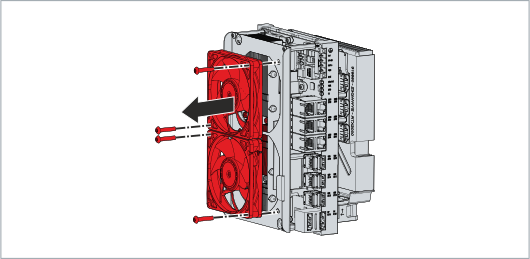 Fig.33: Exchange fans, left side
- You have replaced the fans on the left side of the device.
The old fan must be disposed of in accordance with the national electronic waste regulations.