Disassembly and disposal
Before you can remove the device from the control cabinet, you must first disconnect the power supply and the cables (see Chapter Disconnecting the power supply and cables).
Disassembly with mounting plates
To remove the industrial PC from the control cabinet via Standard mounting plate 1 or optional mounting plate 2, proceed as follows:
- 1. Loosen the fastening screws just enough so that they remain attached to the control cabinet.
- 2. Lift the PC until the fastening screws slide into the keyholes.
- 3. Remove the PC from the control cabinet.
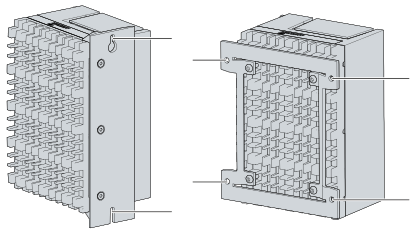 Fig.17: Positions of the fastening screws
- You have successfully disassembled the PC.
Disassembly with DIN rail adapter
To remove the industrial PC from the control cabinet via optional mounting plate 3 with the DIN rail adapter, follow the steps below:
- 1. Push the PC upwards to press in the spring contacts on the DIN rail adapter (A).
- 2. Unhook the upper side of the adapter from the DIN rail (B).
- 3. Also unhook the lower side of the adapter from the DIN rail.
- You have successfully removed the industrial PC from the control cabinet.
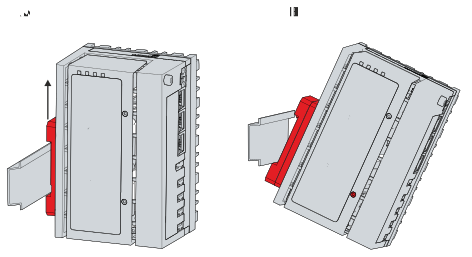 Fig.27: Disassembly of the DIN rail adapter
Disposal
When disposing of the device follow the national electronic scrap regulations. In order to dispose of the device, it must be removed and fully dismantled. Dispose of the components in the following way:
- Send plastic parts (polycarbonate, polyamide (PA6.6)) for plastics recycling.
- Take metal parts to the metal recycling collection point.
- Electronic parts such as fans and circuit boards must be disposed of in accordance with national electronic scrap regulations.
- Stick insulating tape over the poles of the CR2032 battery on the motherboard and dispose of the battery via the local battery recycling.