Replacing the fan
Notice | |
Incorrect fan type The device may be damaged if the wrong type of fan is installed.
|
The fans ensure optimal cooling of the device. Order replacement fans only from Beckhoff. Please get in touch with your Beckhoff sales contact.
Before you can replace the fan and CPU cooler, you must gain access to the interior of the industrial PC (see chapter 7.2.1 Access to device components). You must switch off the industrial PC before you can replace the fan or CPU cooler.
In the basic configuration, there is a 120 x 120 x 25 mm fan behind the front of the industrial PC.
The following table provides information about the assignment of the fan connectors on the motherboard and the respective fan options.
Fan | Connection |
|---|---|
CPU cooler | FAN2/CPU |
Standard fan 120 x 120 x 25 | FAN4 |
Follow these steps to replace the fans:
- 1. Loosen and remove the two M4 screws of the filter cover (section A).
- 2. Remove the filter cover (section B).
- 3. Remove the filter mat (section C).
- 4. Loosen and remove the four M4 screws of the fan (section D).
- 5. Disconnect the power supply cable of the fan from the motherboard.
- 6. Remove the fan (section E).
- 7. Insert the new fan into the industrial PC.
- 8. Connect the power supply cable to the motherboard.
- 9. Fasten the four M4 screws again.
- 10. Reinsert the filter mat. Alternatively, you can order a new filter mat from Beckhoff Sales and insert it.
- 11. Reinstall the filter cover.
- 12. Fasten the filter cover with the two M4 screws.
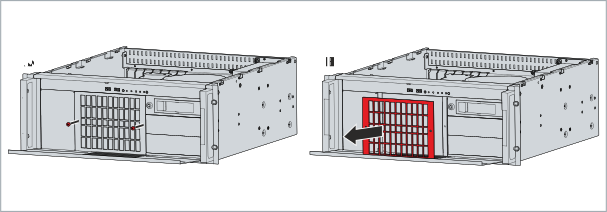 Fig.47: Removing the filter cover
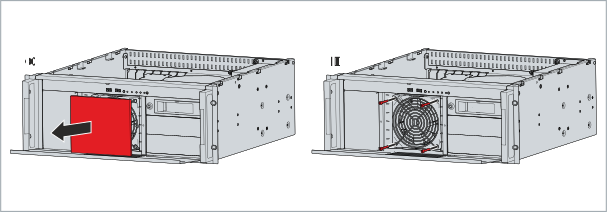 Fig.50: Fan access
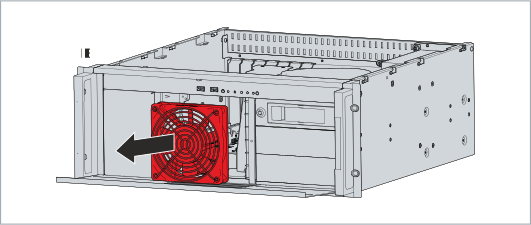 Fig.51: Fan removal
- You have successfully replaced the fan.
The fans in the power supply unit cannot be replaced separately. Instead, you will need to have the entire power supply unit replaced. Please contact Beckhoff Service for this.
Exchange CPU cooler
The CPU cooler on the motherboard consists of a heat sink and a fan mounted on top of it. You can replace this fan yourself. Please contact your Beckhoff sales for a new cooler.
To replace the CPU cooler fan, follow these steps:
- 1. Loosen and remove the four M3 screws that secure the fan to the heat sink.
- 2. Disconnect the fan's power supply cable from the motherboard.
- 3. Remove the fan from the heat sink.
- 4. Place the new fan on the heat sink.
- 5. Connect the power supply cable to the motherboard.
- 6. Insert and tighten the four M3 screws.
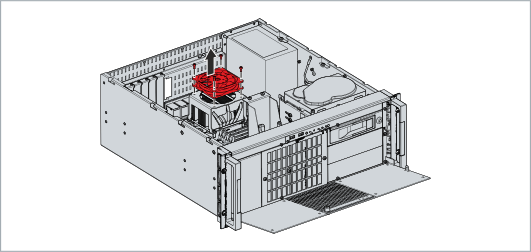 Fig.52: Exchange CPU cooler
- You have replaced the CPU cooler fan.
The old fan must be disposed of in accordance with the national electronic waste regulations.