Name plate
The name plate provides information on the equipment fitted to the industrial PC. The name plate shown here serves only as an example.
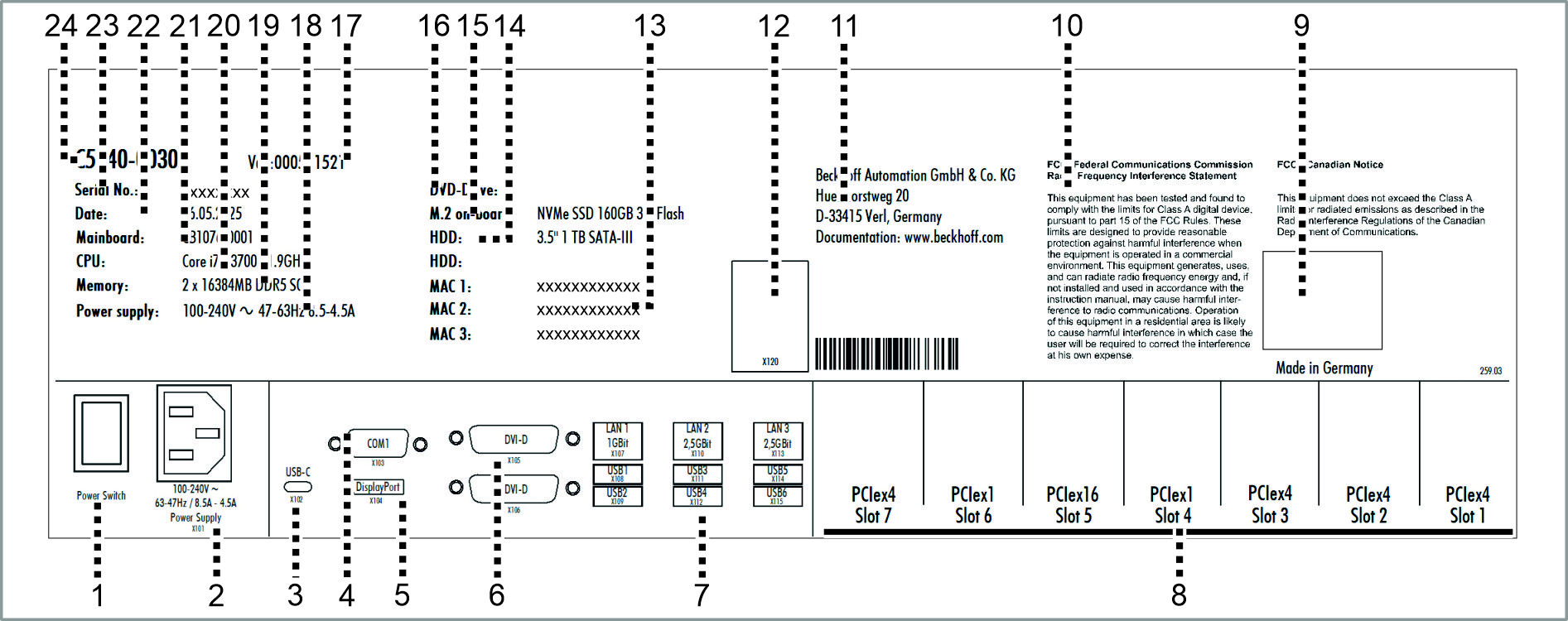 Fig.19: Name plate
No. | Description |
|---|---|
1 | Main switch for switching the device on and off |
2 | Power supply connection (X101) |
3 | USB-C interface (X102) |
4 | Serial interface RS232 (X103) |
5 | DisplayPort (X104) |
6 | DVI interfaces (X105, X106) |
7 | Ethernet interfaces (X107, X110, X113) and USB interfaces (X108, X109, X111, X112, X114, X115) |
8 | Plug-in card slots for options |
9 | Symbols Note: Here are the symbols applicable to the device such as CE, |
10 | FCC approvals |
11 | Address of the vendor |
12 | Optional interface led out in a slot bracket |
13 | MAC addresses of the Ethernet interfaces (X107, X110, X113) |
14 | Hard disk |
15 | NVMeTM SSD |
16 | DVD drive |
17 | Variant number: commercial number of the order code including ordering options |
 . The approvals of your device can be found on the name plate and in chapter 10.2
 No. | Description |
|---|---|
18 | Power supply |
19 | Main memory |
20 | CPU |
21 | Mainboard |
22 | Date of manufacture |
23 | Serial number = Beckhoff Traceability Number (BTN) |
24 | Model: The last four digits indicate the device generation. |