Set up ADS route
If the TwinCAT System Service is running, you can set up an ADS route via the Add Route dialog in TwinCAT Engineering.
Prerequisites:
- The IP address or the host name of the industrial PC must be known
Proceed as follows:
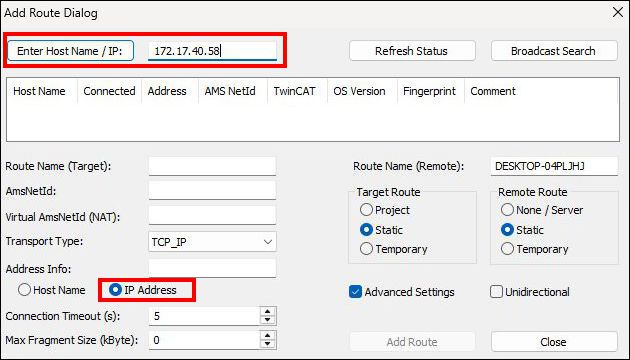
- 1. If you have the IP address of the Linux® system, enter the IP address of the industrial PC and then press Enter Host Name / IP.
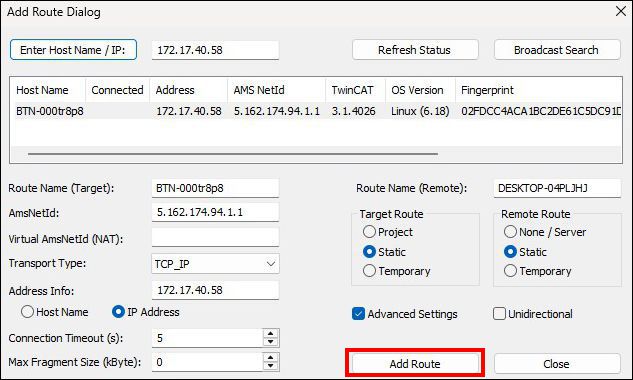
- 2. Mark the desired industrial PC and click on Add Route
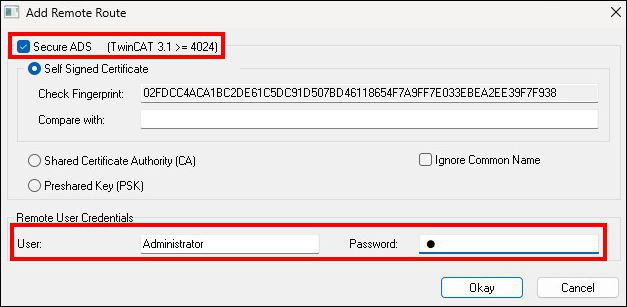
- 3. Log in as "Administrator" with the password "1". Note that only Secure ADS is possible by default.
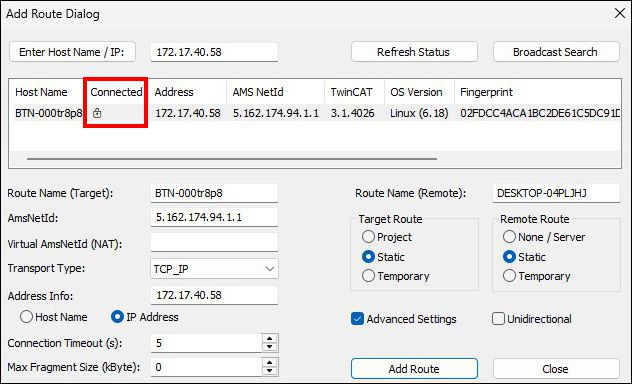
- 4. A successful connection is indicated by a lock symbol under Connected.
- 5. Click Close if you do not want to add any more devices, thereby closing the Add Route dialog.
- You have set up an ADS route. As soon as your TwinCAT Engineering host has established an ADS connection to the TwinCAT Runtime for Linux®, you can create and activate a TwinCAT project.