Network settings
Under Beckhoff RT Linux® the network setting is managed with the system service systemd-networkd. The service is integrated into systemd by default and is used to manage network settings and configure network interfaces.
Before discussing the specific configuration of networks under Beckhoff RT Linux®, it is important to understand the concept of a network interface. A network interface establishes the connection between the system software and the physical or virtual network hardware. Several interfaces can exist on a system, each with a unique identifier, e.g. an index, a device name or an address within a specific network.
The following command can be used to display all network interfaces on the system:
ip link showThe output could look like the following example:
1: lo: <LOOPBACK,UP,LOWER_UP> mtu 65536 qdisc noqueue state UNKNOWN mode DEFAULT group default qlen 1000
    link/loopback 00:00:00:00:00:00 brd 00:00:00:00:00:00
2: eno1: <BROADCAST,MULTICAST,UP,LOWER_UP> mtu 1500 qdisc pfifo_fast state UP mode DEFAULT group default qlen 1000
    link/ether 00:01:05:9d:43:1f brd ff:ff:ff:ff:ff:ff
    altname enp0s31f6
    altname enx0001059d431f
3: enp2s0: <BROADCAST,MULTICAST,UP,LOWER_UP> mtu 1500 qdisc mq state UP mode DEFAULT group default qlen 1000
    link/ether 00:01:05:9d:43:20 brd ff:ff:ff:ff:ff:ff
    altname enx0001059d4320
4: enp3s0: <NO-CARRIER,BROADCAST,MULTICAST,UP> mtu 1500 qdisc mq state DOWN mode DEFAULT group default qlen 1000
    link/ether 00:01:05:9d:43:21 brd ff:ff:ff:ff:ff:ff
    altname enx0001059d4321
5: tap0: <BROADCAST,MULTICAST> mtu 1500 qdisc noop state DOWN mode DEFAULT group default qlen 1000
    link/ether 42:2f:4e:a1:a0:1f brd ff:ff:ff:ff:ff:ff
6: veth123@if7: <BROADCAST,MULTICAST,UP,LOWER_UP> mtu 1500 qdisc noqueue state UP mode DEFAULT group default qlen 1000
    link/ether 82:4d:5a:07:50:77 brd ff:ff:ff:ff:ff:ff link-netns ns1
In this example, four network interfaces are listed with their respective indices and names:
1: lo:
2: eno1:
3: enp2s0:
4: enp3s0:
5: tap0:
6: veth123@if7: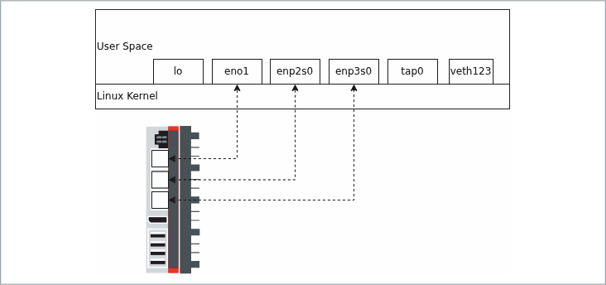
The network interfaces can be categorized as follows: eno1, enp2s0 and enp3s0 are physical network interfaces to external networks; lo is the loopback interface for local traffic on the same computer; tap0 and veth123@if7 are virtual network interfaces used for virtual networks or containers.
The link type is displayed below the index and the name in addition to the type-specific addresses:
1: lo:
    link/loopback 00:00:00:00:00:00 brd 00:00:00:00:00:00
2: eno1:
    link/ether 00:01:05:9d:43:1f brd ff:ff:ff:ff:ff:ff
3: enp2s0:
    link/ether 00:01:05:9d:43:20 brd ff:ff:ff:ff:ff:ff
4: enp3s0:
    link/ether 00:01:05:9d:43:21 brd ff:ff:ff:ff:ff:ff
5: tap0:
    link/ether 42:2f:4e:a1:a0:1f brd ff:ff:ff:ff:ff:ff
6: veth123acd@if8:
    link/ether 8e:ee:0a:95:cb:dc brd ff:ff:ff:ff:ff:ff link-netns ns1
The link type is in the following line directly after "link/"
The type-specific addresses are located directly in the same line as the link type, immediately after "link/<type>":
- The six-byte hex values (e.g. 00:01:05:9d:43:1f) are the link layer addresses (MAC addresses) for "link/ether".
- "brd ff:ff:ff:ff:ff:ff:ff" is the broadcast address of the respective interface.
- For "link/loopback", the addresses are 00:00:00:00:00:00 (loopback link address and broadcast).
Example line: 2: eno1: link/ether 00:01:05:9d:43:1f brd ff:ff:ff:ff:ff:ff:ff → link type = link/ether, link-address = 00:01:05:9d:43:1f, broadcast = ff:ff:ff:ff:ff:ff:ff
Network connections can be managed on this basis.