PowerUnitStatusWord
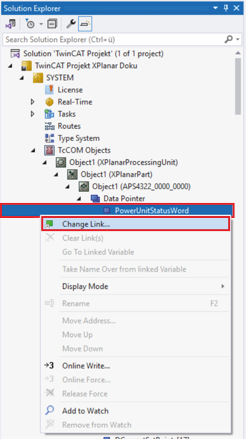
- ►Solution-Explorer > System > TcCOM Objects > Object (XPlanarProcessingUnit) > Object (APS4322_0000_0000) > Data Pointer ausklappen
- ►Mit der rechten Maustaste auf PowerUnitStatusWord klicken, um das Kontextmenü zu öffnen
- ►Im Kontextmenü auf Change Link … klicken
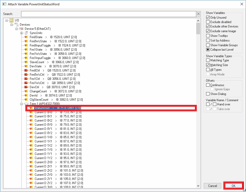
Das Dialogfenster Attach Variable PowerUnitStatusWord öffnet sich.
- ►I/O > Devices > Term 1 (APS4322‑7000) ausklappen
- ►StatusWord auswählen
- ►Auswahl mit OK bestätigen
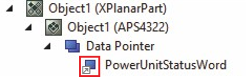
Ein grauer Pfeil an der Variablen zeigt die erfolgreiche Verlinkung an.
Weitere Informationen dazu finden Sie im Kapitel Verlinkungsdetails.